This is Part 2 of a 5-part series on mastering AI-assisted development. Last week, we explored why vibe coding fails and what spec-driven development offers. This week, we’re getting hands-on with the actual workflow.
Series overview
- Part 1: The problem and the solution
- Part 2 (This post): Deep dive into the Spec-Kit workflow
- Part 3 (Jan 19): Best practices and troubleshooting
- Part 4 (Jan 26): Team collaboration and advanced patterns
- Part 5 (Feb 2): Case studies and lessons learned
What we’re building today
To demonstrate the Spec-Kit workflow, we’ll build a real application: a Team Task Manager. Not a hello-world todo list, but something with actual complexity:
- Multi-user authentication
- Team workspaces
- Task assignment and tracking
- Real-time updates
- Responsive design
By the end of this post, you’ll have walked through every step of the Spec-Kit workflow with concrete examples you can adapt to your own projects.
Prerequisites
Before we start, make sure you have:
# Install Spec-Kit CLI
uv tool install specify-cli --from git+https://github.com/github/spec-kit.git

# Verify installation
specify --version

# Install an AI coding assistant (one of these)
# - GitHub Copilot
# - Claude Desktop
# - Cursor
# - Windsurf
Note: The examples in this post use GitHub Copilot, but the workflow is identical for all supported AI agents.
The complete workflow
Here’s the accountability chain we’ll follow:
Constitution → Specification → Plan → Tasks → Implementation
Each step builds on the previous one. Each step produces artifacts that guide the next. Let’s dive in.
Step 1: Initialize your project
First, create your project directory:
specify init team-task-manager
cd team-task-manager
This creates the basic structure with organized folders for agents, prompts, and specification artifacts:
team-task-manager/
├── .github/
├── agents/
├── prompts/
└── .specify/
    ├── memory/
    ├── scripts/
    ├── templates/
    └── .vscode/
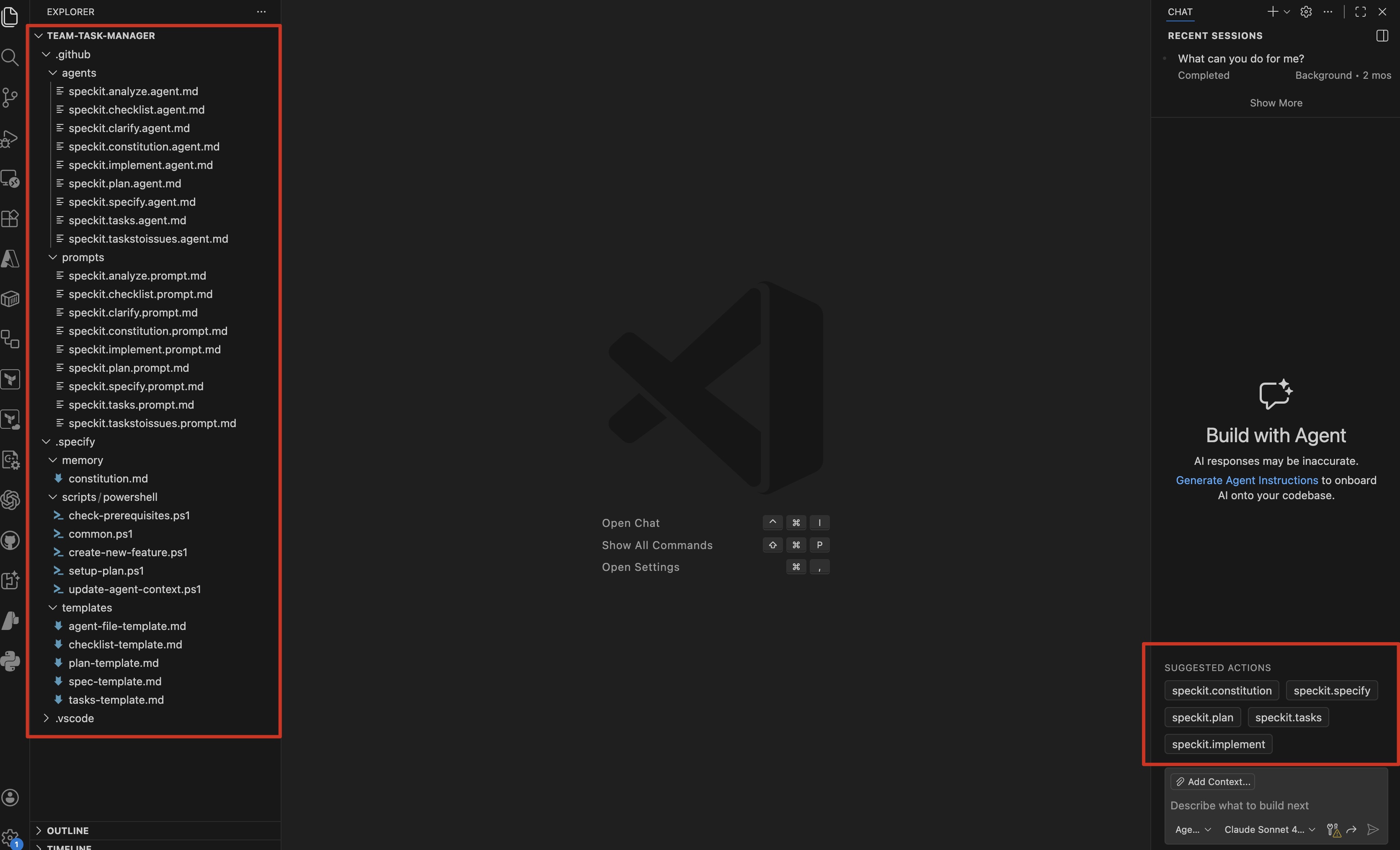 The initialized project structure shown in VS Code
Step 2: Create your constitution
The constitution is your project’s foundation - the non-negotiable principles that guide all decisions.
Important: When you ran specify init, it created a template at .specify/constitution.md with TODOs and placeholder sections. You need to fill this in with your actual project requirements before proceeding.
Here’s what the empty template looks like:
# TODO(PROJECT_NAME) Constitution

## Core Principles

### TODO(PRINCIPLE_1_NAME)
TODO(PRINCIPLE_1_DESCRIPTION): Define first core principle...

### TODO(PRINCIPLE_2_NAME)
TODO(PRINCIPLE_2_DESCRIPTION): Define second core principle...

## Governance

TODO(GOVERNANCE_RULES): Define how this constitution is amended...
What goes in a constitution?
Replace the TODOs with real content:
- Project purpose: What problem are you solving?
- Core principles: What values guide technical decisions?
- Technical constraints: What technologies, frameworks, or patterns must you use?
- Quality standards: What does “done” look like?
- Non-goals: What are you explicitly not building?
Real example: Our Team Task Manager constitution
# Team Task Manager Constitution

## Project Purpose

Build a collaborative task management system for small teams (5-20 people) to organize work, assign tasks, and track progress in real-time.

## Core Principles

### I. Simplicity First
Start with the minimum viable feature set. Complexity must be justified against simpler alternatives. The constitution's Complexity Tracking mechanism MUST be used to document any deviation from this principle.

**Rationale**: Small teams need tools they can understand and maintain. Over-engineering leads to technical debt and slower iteration.

### II. User Experience Over Features
A polished core beats a bloated mess. Every feature must demonstrably improve the user experience. Feature requests that compromise UX quality are rejected.

**Rationale**: Users value reliable, intuitive tools over feature-rich but confusing interfaces.

### III. Security By Design
Authentication and authorization at every layer. Security is non-negotiable and cannot be retrofitted.

**Rationale**: Task management involves sensitive business information. A single breach destroys trust.

### IV. Performance Matters
Sub-second response times for all interactions. Performance targets are requirements, not aspirations.

**Rationale**: Slow tools disrupt workflow. Performance directly impacts user adoption and satisfaction.

### V. Mobile-Friendly
Responsive design, not separate mobile apps. The web interface must work seamlessly on all device sizes.

**Rationale**: Team members work from various devices. Maintaining separate mobile apps increases complexity and violates Principle I.

## Technical Constraints

### Must Use
- **Backend**: .NET 9 with C#
- **Frontend**: Blazor Server (keep it simple, no separate SPA)
- **Database**: SQL Server or PostgreSQL
- **Authentication**: ASP.NET Core Identity
- **Deployment**: Containerized (Docker)

### Must Avoid
- No complex microservices (keep it monolithic for now)
- No separate frontend frameworks (React, Angular, Vue, etc.)
- No over-engineered authentication flows (stick to ASP.NET Core Identity)

**Rationale**: These constraints enforce Principle I (Simplicity First) by limiting architectural complexity and preventing technology sprawl.

## Quality Standards

### Code Quality
- C# nullable reference types MUST be enabled project-wide
- Roslyn analyzers MUST be enabled (minimum: StyleCop.Analyzers)
- EditorConfig MUST be configured for consistent formatting
- All public methods MUST be documented with XML comments

### Testing
- Unit tests for business logic (80%+ coverage REQUIRED)
- Integration tests for all API endpoints
- End-to-end tests for critical user flows (defined as: create team, create task, assign task, complete task)

**Enforcement**: Pull requests failing coverage or missing critical path tests will be rejected.

### Performance
- Page load time < 2 seconds (measured at p95)
- API response time < 500ms (measured at p95)
- Database queries MUST be optimized (execution plans reviewed during code review)

**Enforcement**: Features that regress performance targets will be rolled back.

### Security
- OWASP Top 10 MUST be addressed for all user-facing features
- Dependencies MUST be scanned weekly (automated via CI/CD)
- SQL injection prevention: parameterized queries ONLY (raw SQL prohibited)
- XSS protection: all user input MUST be sanitized

**Enforcement**: Security violations block deployment.

## Non-Goals (What We're NOT Building)

Explicitly out of scope to prevent feature creep:

- ❌ Project management (Gantt charts, resource allocation, burndown charts)
- ❌ Time tracking or invoicing
- ❌ Complex workflows or automation (no custom workflow engines)
- ❌ Native mobile apps (web-first per Principle V)
- ❌ Real-time video/chat (out of scope for task management)

**Rationale**: These features violate Principle I (Simplicity First) and expand scope beyond small team task management. Feature requests in these categories should be politely declined.

## Success Criteria

### MVP (Version 1.0)
- Users can create teams
- Users can create, assign, and complete tasks
- Users can see team activity in real-time
- Application is secure (authentication required, OWASP Top 10 addressed)
- Application is fast (performance targets met)

### Future Enhancements (Post-MVP)
Considered only after MVP is stable and validated with users:
- Task comments and attachments
- Task dependencies and blocking relationships
- Email notifications
- Calendar integration (read-only)

## Governance

### Amendment Process
1. Amendments proposed via pull request to this file
2. Proposed changes must include:
   - Rationale for the change
   - Impact assessment on existing features/plans
   - Migration plan if breaking change
3. Approval requires: project maintainer sign-off
4. Constitution takes precedence over all other documents

### Versioning Policy
Semantic versioning (MAJOR.MINOR.PATCH):
- **MAJOR**: Backward incompatible changes (principle removal, constraint changes that invalidate existing code)
- **MINOR**: New principle or section added, material expansion of guidance
- **PATCH**: Clarifications, wording improvements, non-semantic refinements

### Compliance Review
- All feature specifications MUST reference this constitution
- All implementation plans MUST include "Constitution Check" section
- Code reviews MUST verify adherence to quality standards and technical constraints
- Violations MUST be documented in plan.md Complexity Tracking section

### Review Cadence
Constitution reviewed quarterly or when significant architectural decisions arise.

**Version**: 1.0.0 | **Ratified**: 2026-01-12 | **Last Amended**: 2026-01-12
Why this works
Notice what we’ve done:
- Clear purpose: Everyone knows what we’re building and why
- Explicit constraints: The AI won’t suggest GraphQL or microservices
- Measurable standards: “Fast” means < 500ms, not “feels fast”
- Explicit non-goals: We’re not building Jira
This constitution will be referenced in every subsequent step. When the AI suggests adding time tracking, we can point back to the constitution’s non-goals.
Running the constitution command
In your AI coding assistant, run:
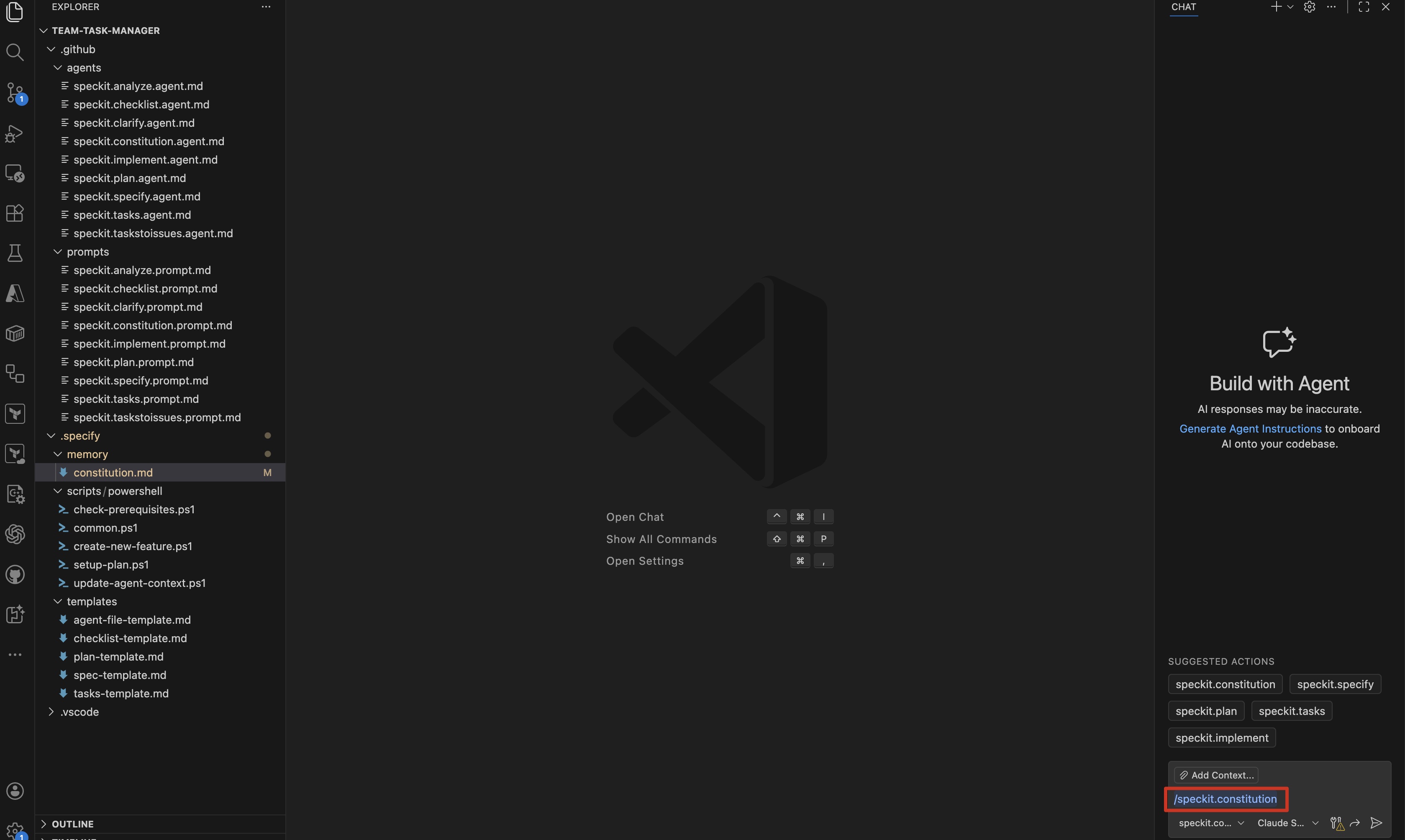 Typing the /speckit.constitution command in GitHub Copilot Chat
The AI will:
- Read the constitution
- Validate it’s complete
- Confirm it understands the constraints
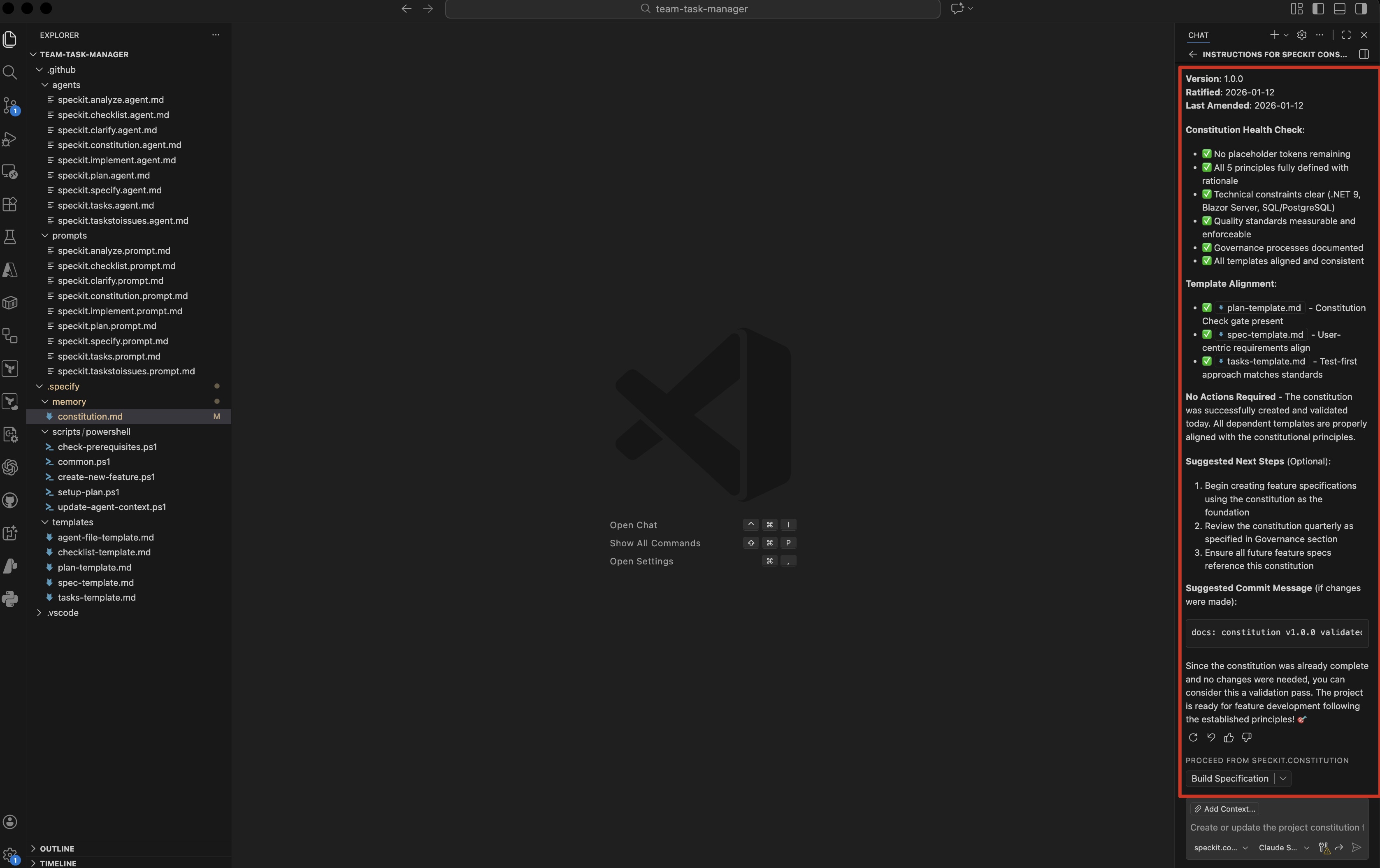 The AI confirms it has read and understood the constitution
Step 3: Write the specification
Now we define what we’re building in detail. The spec focuses on user stories, acceptance criteria, and behavior - not implementation.
The specification structure
A good spec includes:
- User stories: Who does what and why
- Acceptance criteria: What does “done” mean?
- User interface mockups: Visual guides (can be sketches)
- Data requirements: What information flows through the system?
- Edge cases: What happens when things go wrong?
Real example: Team Task Manager spec
Create .speckit/spec.md:
# Team Task Manager Specification

## Overview

A collaborative task management application for small teams to organize work,
assign tasks, and track progress.

---

## User Stories

### Authentication

**As a new user**, I want to:
- Sign up with my email or Google account
- Receive a confirmation email
- Log in securely
- Reset my password if forgotten

**Acceptance Criteria:**
- Sign-up takes < 30 seconds
- Email confirmation sent within 1 minute
- Password reset link expires in 24 hours
- Failed login attempts rate-limited after 5 attempts

---

### Team Management

**As a team admin**, I want to:
- Create a new team with a unique name
- Invite members via email
- Remove members from the team
- Transfer ownership to another member

**Acceptance Criteria:**
- Team names must be unique
- Email invitations expire in 7 days
- Removed members lose access immediately
- Ownership transfer requires confirmation

---

### Task Management

**As a team member**, I want to:
- Create tasks with title, description, and due date
- Assign tasks to myself or team members
- Mark tasks as complete
- Edit or delete tasks I created
- Filter tasks by assignee or status

**Acceptance Criteria:**
- Task creation takes < 5 seconds
- Tasks appear in real-time for all team members
- Completed tasks marked with timestamp
- Only task creator or assignee can edit/delete
- Filters apply instantly (no page reload)

---


## User Interface Requirements

### Dashboard View
- Navigation bar with logo, user menu
- Tab navigation: My Tasks, Team Tasks, Completed
- Filter dropdown: All, Assigned to me, Created by me
- Task cards showing: title, description preview, assignee, due date
- Checkbox to mark tasks complete
- "New Task" button

### Task Detail View
- Back navigation to dashboard
- Task title (editable)
- Creator and creation date
- Assignee dropdown (team members)
- Due date picker
- Status dropdown (Open, In Progress, Completed)
- Description text area
- Delete and Save buttons

### Responsive Behavior
- **Desktop (> 1024px)**: Side-by-side task list and detail
- **Tablet (768-1024px)**: Stacked layout with full-width cards
- **Mobile (< 768px)**: Single-column, touch-optimized buttons

---

## Data Requirements

### Users
- Unique identifier (UUID)
- Email (unique, validated)
- Display name
- Avatar URL (optional)
- Created timestamp
- Last login timestamp

### Teams
- Unique identifier (UUID)
- Team name (unique)
- Owner (user reference)
- Created timestamp
- Member count

### Team Memberships
- Team reference
- User reference
- Role (admin, member)
- Joined timestamp

### Tasks
- Unique identifier (UUID)
- Title (required, max 200 chars)
- Description (optional, max 5000 chars)
- Status (open, in_progress, completed)
- Created by (user reference)
- Assigned to (user reference, optional)
- Team reference
- Due date (optional)
- Created timestamp
- Updated timestamp
- Completed timestamp (nullable)

---

## Edge Cases & Error Handling

### Authentication
- **Scenario**: User tries to access app without logging in
- **Expected**: Redirect to login page, preserve intended destination

- **Scenario**: Session expires while user is working
- **Expected**: Show modal "Session expired, please log in again"

### Task Management
- **Scenario**: Two users edit the same task simultaneously
- **Expected**: Last write wins, show conflict notification

- **Scenario**: User tries to delete a task they didn't create
- **Expected**: Show error "Only task creator can delete"

### Real-time updates
- **Scenario**: Network connection drops
- **Expected**: Show "Offline" indicator, queue updates, sync when reconnected

- **Scenario**: User has 1000+ completed tasks
- **Expected**: Paginate results, load 50 at a time

### Team Management
- **Scenario**: Last admin leaves the team
- **Expected**: Promote oldest member to admin automatically

- **Scenario**: User invited to team they're already in
- **Expected**: Show message "You're already a member"

---

## Performance Requirements

### Page Load
- Initial load: < 2 seconds (3G connection)
- Subsequent navigation: < 500ms

### API Response Times (95th percentile)
- GET requests: < 200ms
- POST/PUT requests: < 500ms
- Real-time updates: < 2 seconds

### Concurrent Users
- Support 100 concurrent users per team
- Support 1000 teams total (MVP target)

---

## Security Requirements

### Authentication
- Passwords hashed with bcrypt (cost factor 12)
- OAuth tokens stored securely (httpOnly cookies)
- MFA support (optional for MVP)

### Authorization
- Role-based access control (RBAC)
- Users can only access teams they belong to
- Task operations checked against user permissions

### Data Protection
- All API requests over HTTPS
- SQL injection prevention (parameterized queries)
- XSS prevention (sanitize user input)
- CSRF tokens on all state-changing requests

### Auditing
- Log all authentication attempts
- Log all task CRUD operations
- Log all team membership changes

---

## Success Metrics

### User Engagement
- Daily active users per team: > 60%
- Tasks created per user per week: > 5
- Task completion rate: > 70%

### System Health
- Uptime: > 99.5%
- Error rate: < 0.1% of requests
- Response time (p95): < 500ms

### User Satisfaction
- NPS score: > 40
- Support tickets per user: < 0.05/month
Why this spec works
This specification gives the AI everything it needs:
- Detailed user stories: Exact behavior expected
- Visual mockups: Clear UI direction (even ASCII art helps!)
- Edge cases: Real-world scenarios covered
- Measurable criteria: “Fast” is defined numerically
Running the specify command
In your AI coding assistant:
The AI will:
- Read the constitution and spec
- Ask clarifying questions
- Validate specification completeness and quality
- Confirm understanding before proceeding
Specification Quality Validation
The specify command validates your specification against quality criteria:
# Specification Quality Checklist: Team Task Manager

## Content Quality
✅ Written for non-technical stakeholders
✅ Focused on user value and business needs
✅ No implementation details (languages, frameworks, APIs)

## Requirement Completeness
✅ No NEEDS CLARIFICATION markers remain
✅ Success criteria are technology-agnostic
✅ All acceptance scenarios are defined
✅ Use cases are identified

## Feature Readiness
✅ All functional requirements have clear acceptance criteria
✅ User scenarios cover primary flows
✅ Feature meets measurable outcomes
✅ No implementation details leak into specification

## Edge Cases
✅ Nine edge case scenarios documented covering:
   - Concurrent editing conflicts
   - Network issues and offline scenarios
   - Data volume and pagination
   - Team management edge cases
   - Authorization failures

## Validation Summary
Status: ✅ PASSED - All quality criteria met

This specification is ready for /speckit.plan
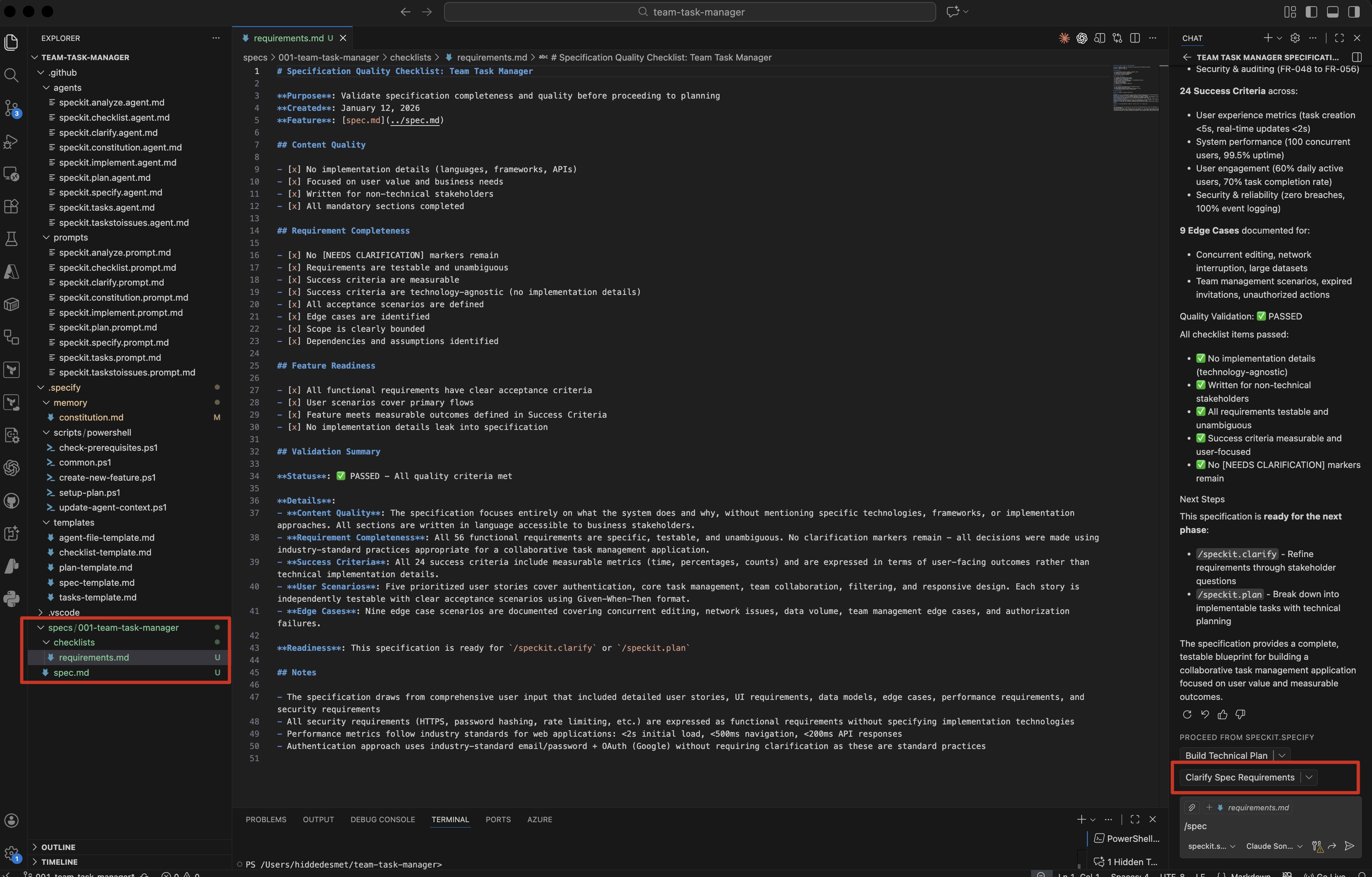 The specification quality checklist confirms all criteria are met
Why this matters: The validation catches common spec issues before you invest time in planning:
- Missing acceptance criteria
- Vague requirements that can’t be tested
- Implementation details leaking into the spec
- Edge cases not considered
Step 4: Generate the technical plan
Now the AI takes our spec and creates a technical plan. This is where we decide how to build it.
Running the plan command
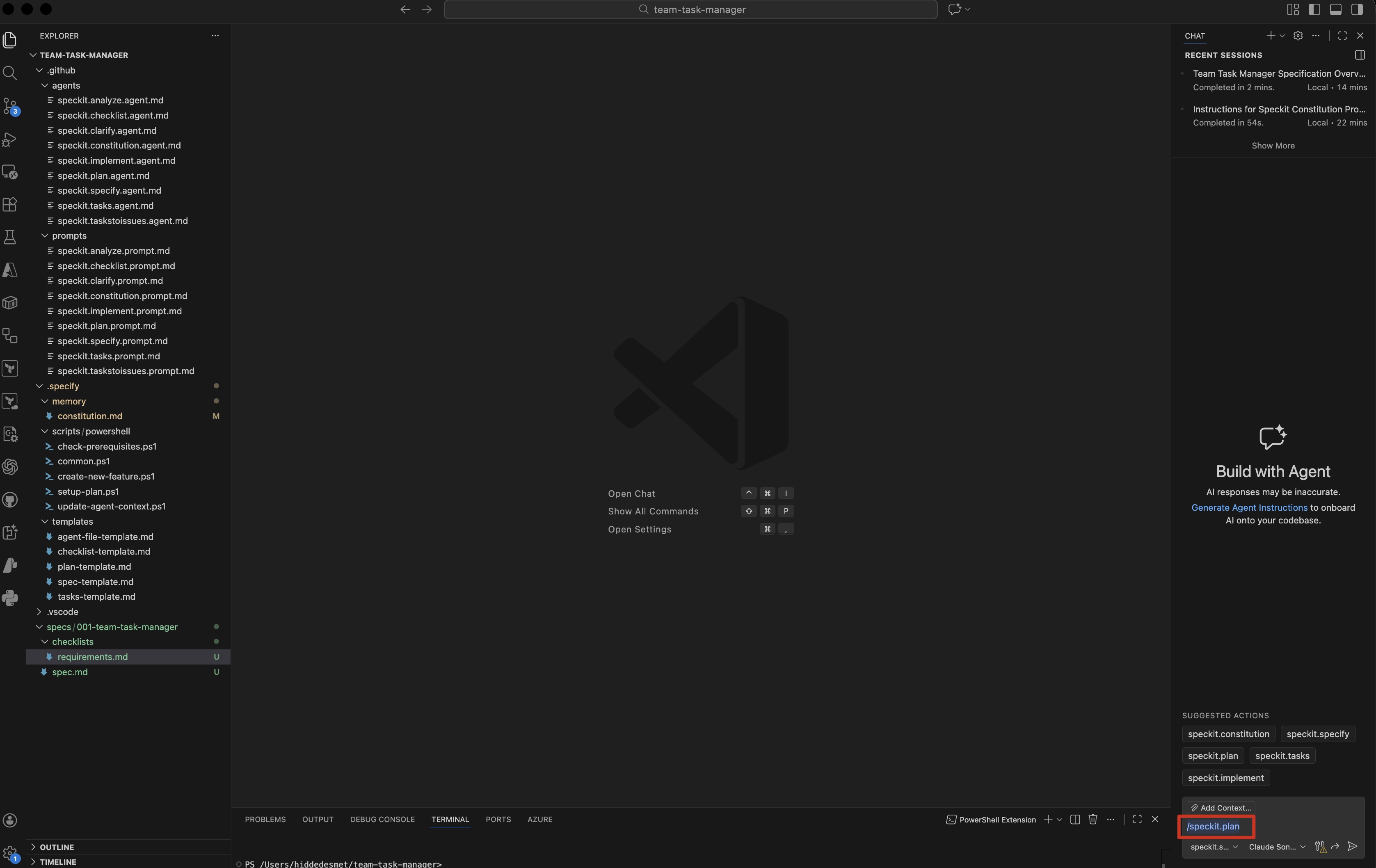 The AI analyzes the spec and generates the technical plan
The AI will generate several artifacts in the /specs/001-team-task-manager/ directory:
requirements.md - Detailed functional requirements and acceptance criteriachecklist.md - Quality validation checklistplan.md - Overall technical architecturedata-model.md - Database schema designapi-specification.md - API contracts and endpoint specifications
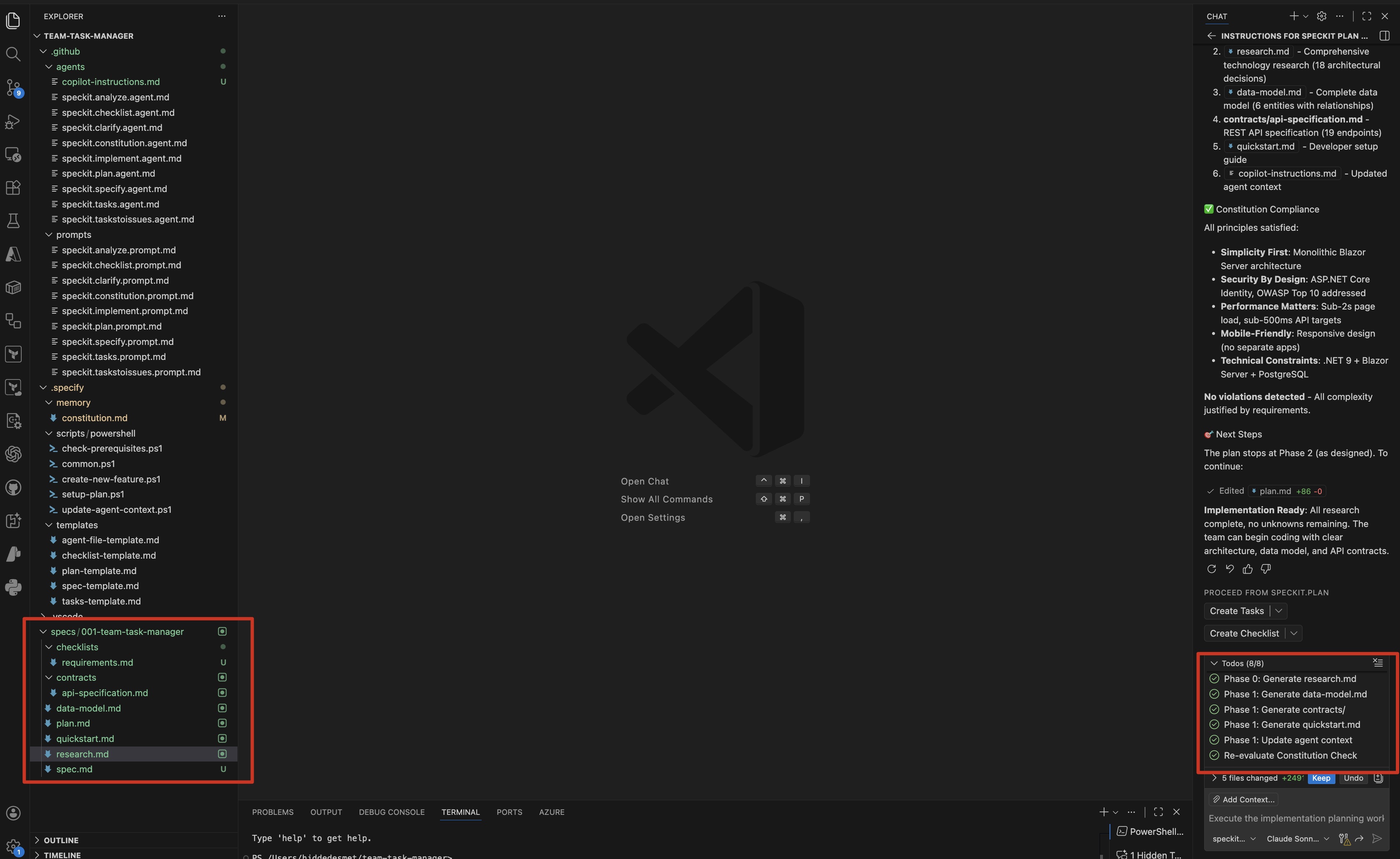 All generated planning artifacts shown in the VS Code file explorer
The requirements.md contains the complete breakdown of functional requirements with Given-When-Then scenarios, while the checklist validates specification quality. The api-specification.md defines all API endpoints, request/response schemas, and integration points before moving forward with implementation.
Real example: Generated plan.md
The AI produces something like this:
# Technical Plan: Team Task Manager

## Technology Stack

### Backend
- **Framework**: .NET 9
- **Language**: C# 13
- **Authentication**: ASP.NET Core Identity
- **Database ORM**: Entity Framework Core 9
- **Validation**: FluentValidation
- **Testing**: xUnit + Moq

### Frontend
- **Framework**: Blazor Server
- **UI Components**: Bootstrap 5 or MudBlazor

### Database
- **Primary**: SQL Server 2022 or PostgreSQL 16+
- **Schema Migrations**: EF Core Migrations
- **Connection Pooling**: Built-in connection pooling

### Infrastructure
- **Containerization**: Docker + Docker Compose
- **Web Server**: Kestrel (built-in)
- **Environment Config**: appsettings.json + User Secrets

---

## Architecture Overview

The application follows a traditional three-tier architecture:

**Presentation Layer**
- Blazor Server (server-side rendering)
- Standard HTTP requests

**Application Layer**
- .NET 9 Web Application
- ASP.NET Core Identity for authentication
- API Controllers for REST endpoints

**Data Layer**
- Entity Framework Core 9
- SQL Server or PostgreSQL database

---

## Database Schema

See `data-model.md` for complete Entity Framework model.

### Key Entities
- `User` - User accounts (ASP.NET Identity)
- `Team` - Team workspaces
- `TeamMember` - Many-to-many relationship
- `Task` - Task data

### Indexes
- `User.Email` (unique)
- `Team.Name` (unique)
- `Task.TeamId` (for filtering)
- `Task.AssignedToId` (for user task views)
- `Task.Status` (for status filters)

---

## API Design

### RESTful Endpoints

#### Authentication
- Built-in ASP.NET Core Identity pages
- `/Account/Register` - Create new user
- `/Account/Login` - Login existing user
- `/Account/Logout` - Logout user

#### Teams
- `GET /api/teams` - List user's teams
- `POST /api/teams` - Create new team
- `GET /api/teams/{id}` - Get team details
- `PUT /api/teams/{id}` - Update team
- `DELETE /api/teams/{id}` - Delete team
- `POST /api/teams/{id}/invite` - Invite member
- `DELETE /api/teams/{id}/members/{userId}` - Remove member

#### Tasks
- `GET /api/teams/{teamId}/tasks` - List team tasks
- `POST /api/teams/{teamId}/tasks` - Create task
- `GET /api/tasks/{id}` - Get task details
- `PUT /api/tasks/{id}` - Update task
- `DELETE /api/tasks/{id}` - Delete task

---

## Security Implementation

### Authentication Flow
1. User submits credentials
2. ASP.NET Core Identity validates
3. Authentication cookie created
4. Authorization policies check on each request

### Authorization Policy
```csharp
// Verify user belongs to team
public class TeamMemberRequirement : IAuthorizationRequirement
{
    public string TeamIdClaimType { get; set; } = "TeamId";
}

public class TeamMemberHandler : AuthorizationHandler<TeamMemberRequirement>
{
    private readonly AppDbContext _context;

    public TeamMemberHandler(AppDbContext context)
    {
        _context = context;
    }

    protected override async Task HandleRequirementAsync(
        AuthorizationHandlerContext context,
        TeamMemberRequirement requirement)
    {
        var userId = context.User.FindFirstValue(ClaimTypes.NameIdentifier);
        var teamId = context.User.FindFirstValue(requirement.TeamIdClaimType);

        if (userId == null || teamId == null)
        {
            return;
        }

        var isMember = await _context.TeamMembers
            .AnyAsync(tm => tm.UserId == userId && tm.TeamId == teamId);

        if (isMember)
        {
            context.Succeed(requirement);
        }
    }
}
Testing Strategy
Unit Tests
- Business logic functions
- Utility helpers
- React hooks
Integration Tests
- API endpoints
- Database operations
- WebSocket events
E2E Tests
- User registration flow
- Task creation and completion
- Team invitation flow
Test Coverage Targets
- Business logic: 90%+
- API routes: 80%+
- UI components: 70%+
Deployment Plan
Development
Production Considerations
- Environment variables via secrets
- Database connection pooling
- Rate limiting on auth endpoints
- CORS configured for production domain
- Logging to stdout (12-factor app)
Open Questions
- Email service: Use SendGrid, AWS SES, or Mailgun?
- File storage: Do we need task attachments? (Not in spec)
- Monitoring: Application Insights, Datadog, or self-hosted?
These should be resolved before implementation.
### Generated data-model.md

```markdown
# Data Model: Team Task Manager

## Entity Framework Core Models

```csharp
// Models/User.cs
public class User : IdentityUser
{
    public string DisplayName { get; set; } = string.Empty;
    public string? AvatarUrl { get; set; }
    public DateTime CreatedAt { get; set; } = DateTime.UtcNow;
    public DateTime? LastLoginAt { get; set; }

    // Navigation properties
    public ICollection<TeamMember> TeamMemberships { get; set; } = new List<TeamMember>();
    public ICollection<Task> CreatedTasks { get; set; } = new List<Task>();
    public ICollection<Task> AssignedTasks { get; set; } = new List<Task>();
    public ICollection<Team> OwnedTeams { get; set; } = new List<Team>();
}

// Models/Team.cs
public class Team
{
    public string Id { get; set; } = Guid.NewGuid().ToString();
    public string Name { get; set; } = string.Empty;
    public string OwnerId { get; set; } = string.Empty;
    public DateTime CreatedAt { get; set; } = DateTime.UtcNow;

    // Navigation properties
    public User Owner { get; set; } = null!;
    public ICollection<TeamMember> Members { get; set; } = new List<TeamMember>();
    public ICollection<Task> Tasks { get; set; } = new List<Task>();
}

// Models/TeamMember.cs
public class TeamMember
{
    public string Id { get; set; } = Guid.NewGuid().ToString();
    public string TeamId { get; set; } = string.Empty;
    public string UserId { get; set; } = string.Empty;
    public Role Role { get; set; } = Role.Member;
    public DateTime JoinedAt { get; set; } = DateTime.UtcNow;

    // Navigation properties
    public Team Team { get; set; } = null!;
    public User User { get; set; } = null!;
}

// Models/Task.cs
public class Task
{
    public string Id { get; set; } = Guid.NewGuid().ToString();
    public string Title { get; set; } = string.Empty;
    public string? Description { get; set; }
    public TaskStatus Status { get; set; } = TaskStatus.Open;
    public string TeamId { get; set; } = string.Empty;
    public string CreatedById { get; set; } = string.Empty;
    public string? AssignedToId { get; set; }
    public DateTime? DueDate { get; set; }
    public DateTime CreatedAt { get; set; } = DateTime.UtcNow;
    public DateTime UpdatedAt { get; set; } = DateTime.UtcNow;
    public DateTime? CompletedAt { get; set; }

    // Navigation properties
    public Team Team { get; set; } = null!;
    public User CreatedBy { get; set; } = null!;
    public User? AssignedTo { get; set; }
}

// Enums
public enum Role
{
    Admin,
    Member
}

public enum TaskStatus
{
    Open,
    InProgress,
    Completed
}
Relationships
User to Team (Many-to-Many via TeamMember)
- A user can belong to multiple teams
- A team can have multiple users
Team to Task (One-to-Many)
- A team has many tasks
- Each task belongs to one team
User to Task (Multiple relationships)
- A user creates many tasks (CreatedBy)
- A user can be assigned many tasks (AssignedTo)
- Each task has one creator and optionally one assignee
Indexes
tasks.teamId - Filtering tasks by teamtasks.assignedToId - User task viewstasks.status - Status filtering
Uniqueness constraints
users.email - One account per emailteams.name - Unique team namesteam_members.[teamId, userId] - No duplicate memberships
Migration strategy
# Create initial migration
dotnet ef migrations add InitialCreate

# Apply to database
dotnet ef database update

# Seed demo data
dotnet run --seed
Production: Always backup before applying migrations
Why these generated plans work
The AI has:
- Made concrete technology choices: React, Express, PostgreSQL (aligned with constitution)
- Designed the data model: Prisma schema with relationships
- Specified API contracts: Every endpoint documented
- Included security patterns: Middleware examples
- Identified open questions: Decisions that need human input
This is where you review carefully. Does the tech stack make sense? Are there better options? Now’s the time to adjust.
Step 5: Break down into tasks
Now we convert the plan into implementable tasks.
Running the tasks command
The AI generates tasks.md with 137 ordered, actionable tasks organized by user story.
Here’s how the AI structures the implementation:
# Tasks: Team Task Manager

**Organization**: Tasks are grouped by user story to enable independent
implementation and testing of each story.

## Format: `- [ ] [ID] [P?] [Story?] Description`

- **[P]**: Can run in parallel (different files, no dependencies)
- **[Story]**: Which user story this task belongs to (e.g., US1, US2)

---

## Phase 1: Setup (Shared Infrastructure)

**Purpose**: Project initialization and basic structure

- [ ] T001 Create .NET 9 solution with TeamTaskManager project and test project
- [ ] T002 Configure project settings: enable nullable reference types
- [ ] T003 [P] Add NuGet packages: EF Core, Npgsql, Identity
- [ ] T004 [P] Create EditorConfig with StyleCop.Analyzers configuration
- [ ] T005 [P] Create docker-compose.yml with PostgreSQL service
- [ ] T006 [P] Create Dockerfile with multi-stage build
- [ ] T007 Create directory structure: Components, Models, Data, Services, Auth
- [ ] T008 Create appsettings.json with connection string placeholders
- [ ] T009 Create .gitignore excluding appsettings.Development.json

---

## Phase 2: Foundational (Blocking Prerequisites)

**Purpose**: Core infrastructure that MUST be complete before ANY user story

⚠️ **CRITICAL**: No user story work can begin until this phase is complete

- [ ] T010 Create User entity model with all properties from data-model.md
- [ ] T011 Create Team entity model with all properties
- [ ] T012 [P] Create Task entity with Status enum and RowVersion for concurrency
- [ ] T013 [P] Create TeamMembership entity with Role enum
- [ ] T014 [P] Create TeamInvitation entity with Status enum
- [ ] T015 [P] Create AuditLog entity model
- [ ] T016 Create ApplicationDbContext extending IdentityDbContext<User>
- [ ] T017 Configure entity relationships using Fluent API per data-model.md
- [ ] T018 Create indexes: Task(TeamId,Status), TeamMembership(TeamId,UserId)
- [ ] T019 Create initial EF Core migration: dotnet ef migrations add InitialCreate
- [ ] T020 Configure ASP.NET Core Identity with password requirements
- [ ] T021 Configure authentication: AddIdentity, cookie settings (24hr expiration)
- [ ] T022 Create custom AuthenticationStateProvider for Blazor
- [ ] T023 [P] Create IRepository<T> interface
- [ ] T024 [P] Create Repository<T> implementation with async methods
- [ ] T025 Configure error handling middleware
- [ ] T026 Configure structured logging using ILogger<T>
- [ ] T027 Configure rate limiting middleware per API specification
- [ ] T028 Create MainLayout.razor with navigation and auth state
- [ ] T029 Create NavMenu.razor with conditional rendering
- [ ] T030 Configure SignalR hub with connection timeout and group support

**Checkpoint**: Foundation ready - user story implementation can now begin in parallel

---

## Phase 3: User Story 2 - User Authentication (Priority: P1) 🎯 MVP Foundation

**Goal**: Enable secure user sign-up, login, and password recovery

**Independent Test**: Sign up with email, log in, reset password, verify rate limiting

**Why First**: Authentication is foundational - required before collaborative features

### Implementation for User Story 2

- [ ] T031 [P] [US2] Create Register.razor page with email/password form
- [ ] T032 [P] [US2] Create Login.razor page with email/password form
- [ ] T033 [P] [US2] Create ForgotPassword.razor page with email input
- [ ] T034 [P] [US2] Create ResetPassword.razor page with token validation
- [ ] T035 [US2] Create AuthService with RegisterAsync, LoginAsync, LogoutAsync
- [ ] T036 [US2] Implement email confirmation using ASP.NET Core Identity tokens
- [ ] T037 [US2] Implement password reset with 24-hour token expiration
- [ ] T038 [US2] Implement rate limiting: 5 attempts, 15-minute lockout
- [ ] T039 [US2] Add session expiration: 24-hour absolute expiration
- [ ] T040 [US2] Create AuditService with LogAsync method
- [ ] T041 [US2] Add audit logging for authentication events
- [ ] T042 [US2] Create IEmailService interface
- [ ] T043 [US2] Create SendGridEmailService implementation
- [ ] T044 [US2] Add email templates for confirmation and password reset
- [ ] T045 [US2] Wire up Register page to AuthService with validation
- [ ] T046 [US2] Wire up Login page with error handling
- [ ] T047 [US2] Wire up ForgotPassword and ResetPassword pages
- [ ] T048 [US2] Add redirect to preserved destination after login
- [ ] T049 [US2] Create API endpoints: POST /api/auth/register, /login, /logout

**Checkpoint**: Users can sign up, log in, reset passwords securely

---

## Phase 4: User Story 1 - Task Management Core (Priority: P1) 🎯 MVP

**Goal**: Enable task creation, assignment, editing, and completion

**Independent Test**: Create task, edit description, mark complete, verify timestamp

**Why Second**: Core value proposition - delivers immediate task tracking

### Implementation for User Story 1

- [ ] T050 [P] [US1] Create TaskCard.razor component
- [ ] T051 [P] [US1] Create TaskDetailModal.razor for editing
- [ ] T052 [P] [US1] Create NewTaskModal.razor for creating tasks
- [ ] T053 [US1] Create Tasks.razor page with task list view
- [ ] T054 [US1] Create TaskService with CRUD methods
- [ ] T055 [US1] Implement CreateTaskAsync with validation
- [ ] T056 [US1] Implement UpdateTaskAsync with optimistic concurrency using RowVersion
- [ ] T057 [US1] Implement CompleteTaskAsync setting CompletedAt timestamp
- [ ] T058 [US1] Implement DeleteTaskAsync with creator-only authorization
- [ ] T059 [US1] Add authorization: only creator/assignee can edit
- [ ] T060 [US1] Implement real-time task broadcast using SignalR (< 2 seconds)
- [ ] T061 [US1] Add audit logging for task operations
- [ ] T062 [US1] Wire up Tasks.razor to TaskService with data loading
- [ ] T063 [US1] Wire up NewTaskModal with form validation
- [ ] T064 [US1] Wire up TaskDetailModal with concurrency conflict handling
- [ ] T065 [US1] Add checkbox for marking complete
- [ ] T066 [US1] Implement SignalR hub subscription for real-time updates
- [ ] T067 [US1] Add "New Task" button opening NewTaskModal
- [ ] T068 [US1] Handle concurrent edit conflict: show notification with conflicting user
- [ ] T069 [US1] Create API endpoints: GET/POST /api/teams/{teamId}/tasks, etc.

**Checkpoint**: Users can create, assign, edit, complete tasks with real-time updates

---

## Phase 5: User Story 3 - Team Collaboration (Priority: P2)

**Goal**: Enable team creation, member invitations, and membership management

**Why Third**: Enables collaboration; builds on tasks and auth

- [ ] T070-T094 [US3] Team management implementation (25 tasks)
  - Create Teams.razor, TeamSettings.razor, invitation flows
  - Implement TeamService and MembershipService
  - Email invitations with 7-day expiration
  - Auto-promote oldest member when last admin leaves
  - Handle edge cases: duplicate invitations, expired tokens

**Checkpoint**: Users can create teams, invite members, manage membership

---

## Phase 6: User Story 4 - Task Filtering (Priority: P2)

**Goal**: Enable filtering by assignee, status, and creator

- [ ] T095-T106 [US4] Filtering implementation (12 tasks)
  - Create TaskFilters.razor component
  - Implement instant filtering without page reload
  - Add pagination for completed tasks (50 per page)
  - Optimize queries using database indexes

**Checkpoint**: Users can filter tasks instantly by multiple criteria

---

## Phase 7: User Story 5 - Responsive Interface (Priority: P3)

**Goal**: Ensure mobile, tablet, and desktop layouts work seamlessly

- [ ] T107-T117 [US5] Responsive UI implementation (11 tasks)
  - Mobile-first CSS with 768px and 1024px breakpoints
  - Touch-optimized buttons (44px minimum)
  - Hamburger menu for mobile navigation
  - Test across device sizes

**Checkpoint**: Application works on all device sizes

---

## Phase 8: Polish & Cross-Cutting Concerns

**Purpose**: Final quality, security hardening, performance optimization

- [ ] T118-T137 Polish tasks (20 tasks)
  - Health check endpoint
  - CORS, HTTPS, anti-forgery tokens
  - Input sanitization for XSS prevention
  - Database query optimization
  - Caching with IMemoryCache
  - Performance testing: < 2s page load, < 500ms API
  - OWASP Top 10 security review

---

## Task count summary

- **Phase 1 (Setup)**: 9 tasks
- **Phase 2 (Foundational)**: 21 tasks ← Critical path
- **Phase 3 (US2 - Auth)**: 19 tasks ← P1 (MVP Foundation)
- **Phase 4 (US1 - Tasks)**: 20 tasks ← P1 (MVP Core)
- **Phase 5 (US3 - Teams)**: 25 tasks ← P2
- **Phase 6 (US4 - Filtering)**: 12 tasks ← P2
- **Phase 7 (US5 - Responsive)**: 11 tasks ← P3
- **Phase 8 (Polish)**: 20 tasks ← Cross-cutting

**Total**: 137 tasks

**MVP Scope (Phases 1-5)**: 94 tasks (~69% of total)

---

## Dependencies and execution order
Foundational (Phase 2)
↓
US2: Auth (Phase 3) ← MVP Foundation
↓
US1: Tasks (Phase 4) ← MVP Core + US3: Teams (Phase 5) ← Can parallelize
↓
US4: Filtering (Phase 6) ← Enhances US1
↓
US5: Responsive (Phase 7) ← Enhances all UIs
↓
Polish (Phase 8)
**Recommended Order**: Setup → Foundational → US2 → US3 → US1 → US4 → US5 → Polish

**MVP Milestone**: Phases 1-5 = Basic task management with teams

---

## Parallel opportunities

**Phase 1 (Setup)**: T003-T006 can run in parallel
**Phase 2 (Foundational)**: T012-T015 (entity models), T023-T024 (repositories)
**Phase 3 (US2)**: T031-T034 (all auth pages) at start
**Phase 4 (US1)**: T050-T052 (all task components) at start
**Phase 8 (Polish)**: Most tasks (T118-T128) can parallelize

---

## Implementation strategy

### MVP First (2-3 weeks for single developer)

1. **Week 1**: Setup + Foundational → 2-3 days
2. **Week 1-2**: User Story 2 (Auth) → 3-4 days
3. **Week 2**: User Story 3 (Teams) → 2-3 days
4. **Week 2-3**: User Story 1 (Tasks) → 3-4 days
5. **VALIDATE MVP**: Can users sign up, create teams, manage tasks?

**Deploy at this point** - Core value delivered

### Incremental Delivery

1. **Foundation** → Infrastructure ready
2. **MVP** (US2, US3, US1) → Users, teams, tasks working → **DEPLOY**
3. **Enhancement 1** (US4) → Task filtering → **DEPLOY**
4. **Enhancement 2** (US5) → Responsive UI → **DEPLOY**
5. **Polish** → Performance, security hardening → **DEPLOY**
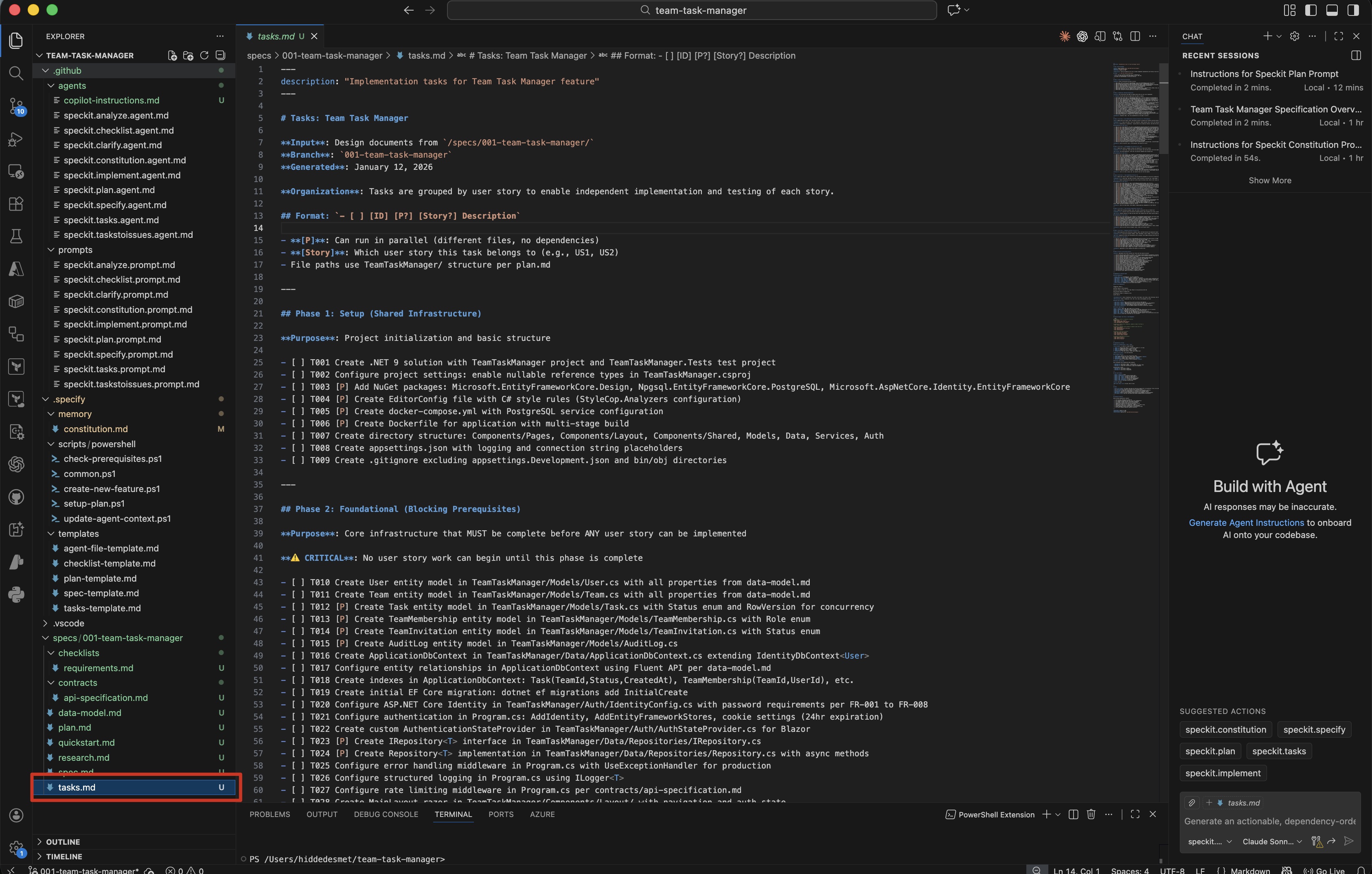 The tasks.md file showing phased implementation with dependencies
Why this breakdown works
Each task:
- Has clear dependencies: Won’t fail due to missing prerequisites
- Is independently testable: Can verify completion
- Has acceptance criteria: We know when it’s done
- Is sized appropriately: Can be completed in 2-4 hours
Step 6: Implementation
Finally, we implement. This is where the AI writes code.
Running the implement command
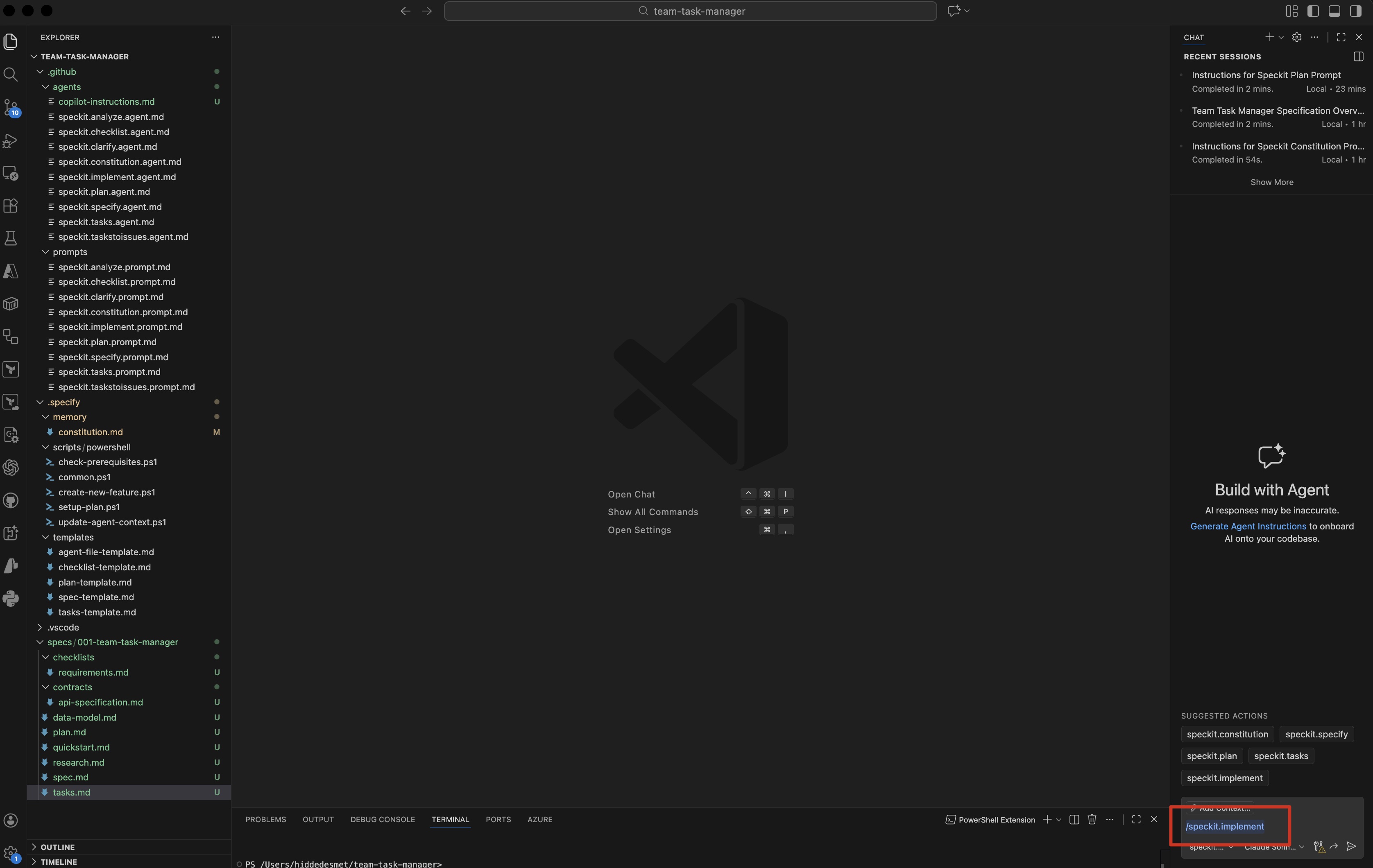 Starting the implementation phase
The AI will:
- Load constitution, spec, plan, and tasks
- Execute tasks in order
- Create files, write code, run tests
- Report progress after each task
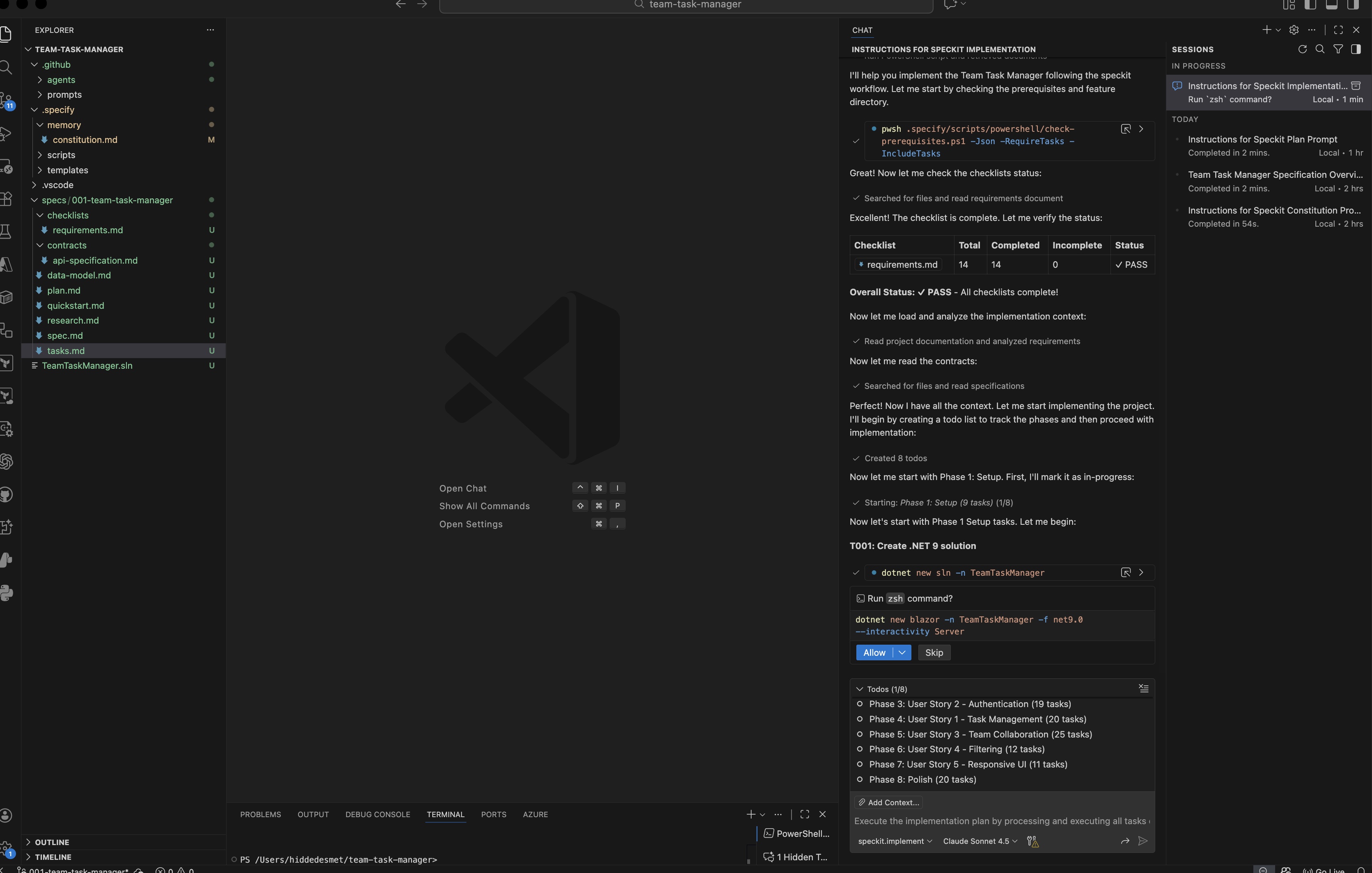 The AI creating files and implementing tasks with progress updates
What the AI generates
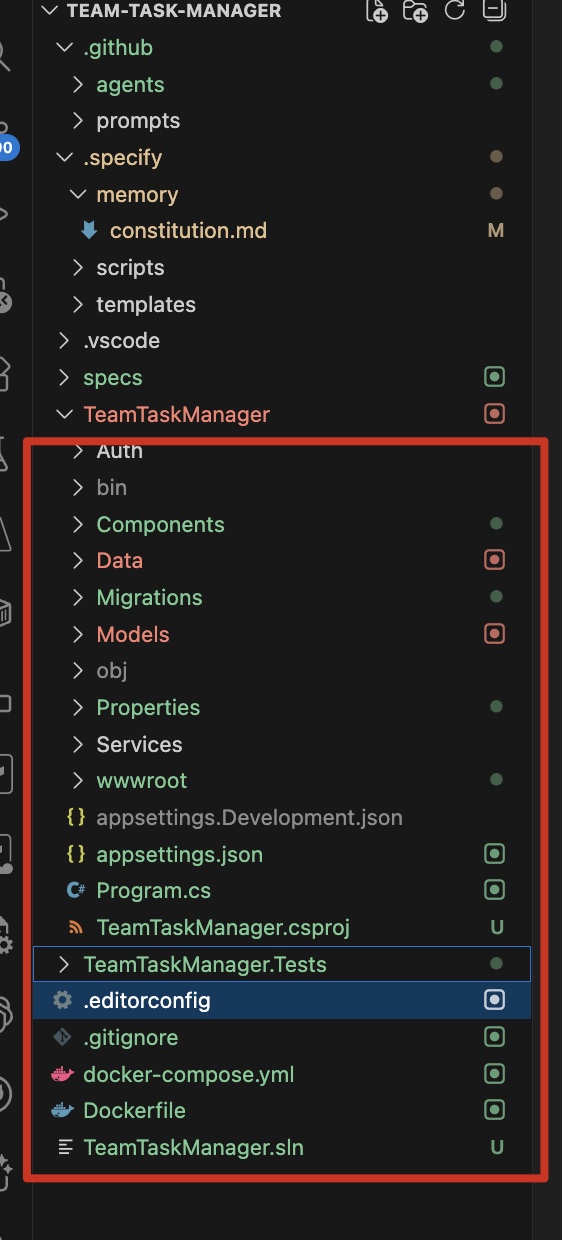 The complete project structure after implementation
Here’s a sample of generated code:
Backend: Task creation endpoint
using Microsoft.AspNetCore.SignalR;
using Microsoft.EntityFrameworkCore;
using TeamTaskManager.Data;
using TeamTaskManager.Hubs;
using TeamTaskManager.Models;

namespace TeamTaskManager.Services;

public class TaskService
{
    private readonly ApplicationDbContext _context;
    private readonly IHubContext<TaskHub> _hubContext;
    private readonly AuditService _auditService;
    private readonly IHttpContextAccessor _httpContextAccessor;

    public TaskService(
        ApplicationDbContext context,
        IHubContext<TaskHub> hubContext,
        AuditService auditService,
        IHttpContextAccessor httpContextAccessor)
    {
        _context = context;
        _hubContext = hubContext;
        _auditService = auditService;
        _httpContextAccessor = httpContextAccessor;
    }

    public async System.Threading.Tasks.Task<Models.Task> CreateTaskAsync(Models.Task task)
    {
        try
        {
            _context.Tasks.Add(task);
            await _context.SaveChangesAsync();

            // Load related entities for SignalR broadcast
            await _context.Entry(task).Reference(t => t.Creator).LoadAsync();
            await _context.Entry(task).Reference(t => t.Assignee).LoadAsync();

            // Log audit event
            await _auditService.LogAsync(
                "TaskCreated",
                task.CreatorId,
                GetClientIpAddress(),
                new { TaskId = task.Id, Title = task.Title, TeamId = task.TeamId }
            );

            // Broadcast to team members via SignalR (within 2 seconds per FR-028)
            if (task.TeamId.HasValue)
            {
                await _hubContext.Clients.Group($"team_{task.TeamId.Value}")
                    .SendAsync("TaskCreated", task);
            }

            return task;
        }
        catch (Exception ex)
        {
            throw new ApplicationException($"Failed to create task: {ex.Message}", ex);
        }
    }

    public async System.Threading.Tasks.Task<Models.Task> UpdateTaskAsync(Models.Task task)
    {
        try
        {
            var existingTask = await _context.Tasks
                .Include(t => t.Creator)
                .Include(t => t.Assignee)
                .FirstOrDefaultAsync(t => t.Id == task.Id);

            if (existingTask == null)
            {
                throw new InvalidOperationException("Task not found");
            }

            // Optimistic concurrency check using RowVersion (per FR-043, FR-044)
            if (existingTask.RowVersion != null && task.RowVersion != null &&
                !existingTask.RowVersion.SequenceEqual(task.RowVersion))
            {
                throw new DbUpdateConcurrencyException("Task was modified by another user. Please refresh and try again.");
            }

            // Update fields
            existingTask.Title = task.Title;
            existingTask.Description = task.Description;
            existingTask.Status = task.Status;
            existingTask.DueDate = task.DueDate;
            existingTask.UpdatedAt = DateTime.UtcNow;
            existingTask.AssigneeId = task.AssigneeId;

            if (task.Status == Models.TaskStatus.Completed && !existingTask.CompletedAt.HasValue)
            {
                existingTask.CompletedAt = DateTime.UtcNow;
            }

            await _context.SaveChangesAsync();

            // Log audit event
            await _auditService.LogAsync(
                "TaskUpdated",
                task.CreatorId,
                GetClientIpAddress(),
                new { TaskId = task.Id, Title = task.Title, Status = task.Status }
            );

            // Broadcast to team members via SignalR
            if (existingTask.TeamId.HasValue)
            {
                await _hubContext.Clients.Group($"team_{existingTask.TeamId.Value}")
                    .SendAsync("TaskUpdated", existingTask);

                if (existingTask.Status == Models.TaskStatus.Completed)
                {
                    await _hubContext.Clients.Group($"team_{existingTask.TeamId.Value}")
                        .SendAsync("TaskCompleted", existingTask);
                }
            }

            return existingTask;
        }
        catch (DbUpdateConcurrencyException)
        {
            throw; // Rethrow concurrency exceptions as-is
        }
        catch (Exception ex)
        {
            throw new ApplicationException($"Failed to update task: {ex.Message}", ex);
        }
    }

    public async System.Threading.Tasks.Task DeleteTaskAsync(int taskId)
    {
        try
        {
            var task = await _context.Tasks.FindAsync(taskId);

            if (task == null)
            {
                throw new InvalidOperationException("Task not found");
            }

            var teamId = task.TeamId;
            var creatorId = task.CreatorId;

            _context.Tasks.Remove(task);
            await _context.SaveChangesAsync();

            // Log audit event
            await _auditService.LogAsync(
                "TaskDeleted",
                creatorId,
                GetClientIpAddress(),
                new { TaskId = taskId, TeamId = teamId }
            );

            // Broadcast to team members via SignalR
            if (teamId.HasValue)
            {
                await _hubContext.Clients.Group($"team_{teamId.Value}")
                    .SendAsync("TaskDeleted", taskId);
            }
        }
        catch (Exception ex)
        {
            throw new ApplicationException($"Failed to delete task: {ex.Message}", ex);
        }
    }

    public async System.Threading.Tasks.Task<Models.Task?> GetTaskByIdAsync(int taskId)
    {
        return await _context.Tasks
            .Include(t => t.Creator)
            .Include(t => t.Assignee)
            .Include(t => t.Team)
            .FirstOrDefaultAsync(t => t.Id == taskId);
    }

    public async System.Threading.Tasks.Task<List<Models.Task>> GetUserTasksAsync(string userId)
    {
        return await _context.Tasks
            .Include(t => t.Creator)
            .Include(t => t.Assignee)
            .Include(t => t.Team)
            .Where(t => t.CreatorId == userId || t.AssigneeId == userId)
            .OrderBy(t => t.Status)
            .ThenByDescending(t => t.CreatedAt)
            .ToListAsync();
    }

    public async System.Threading.Tasks.Task<List<Models.Task>> GetTeamTasksAsync(int teamId)
    {
        return await _context.Tasks
            .Include(t => t.Creator)
            .Include(t => t.Assignee)
            .Where(t => t.TeamId == teamId)
            .OrderBy(t => t.Status)
            .ThenByDescending(t => t.CreatedAt)
            .ToListAsync();
    }

    private string? GetClientIpAddress()
    {
        var httpContext = _httpContextAccessor.HttpContext;

        if (httpContext == null)
        {
            return null;
        }

        var forwardedFor = httpContext.Request.Headers["X-Forwarded-For"].FirstOrDefault();
        if (!string.IsNullOrEmpty(forwardedFor))
        {
            return forwardedFor.Split(',')[0].Trim();
        }

        return httpContext.Connection.RemoteIpAddress?.ToString();
    }
}
Frontend: Task list component
@using TeamTaskManager.Models
@using TaskStatus = TeamTaskManager.Models.TaskStatus

<div class="card mb-3 task-card" @onclick="OnTaskClick">
    <div class="card-body">
        <div class="d-flex justify-content-between align-items-start">
            <h6 class="card-title mb-2">@Task.Title</h6>
            <span class="badge @GetStatusBadgeClass()">@Task.Status</span>
        </div>

        @if (!string.IsNullOrEmpty(Task.Description))
        {
            <p class="card-text text-muted small mb-2">
                @(Task.Description.Length > 100 ? Task.Description.Substring(0, 100) + "..." : Task.Description)
            </p>
        }

        <div class="d-flex justify-content-between align-items-center">
            <small class="text-muted">
                @if (Task.DueDate.HasValue)
                {
                    <i class="bi bi-calendar"></i>
                    <span class="@(Task.DueDate.Value < DateTime.UtcNow && Task.Status != TaskStatus.Completed ? "text-danger" : "")">
                        @Task.DueDate.Value.ToString("MMM d, yyyy")
                    </span>
                }
            </small>

            @if (Task.Assignee != null)
            {
                <small class="text-muted">
                    <i class="bi bi-person"></i> @Task.Assignee.DisplayName
                </small>
            }
        </div>
    </div>
</div>

@code {
    [Parameter]
    public TeamTaskManager.Models.Task Task { get; set; } = default!;

    [Parameter]
    public Action? OnTaskClick { get; set; }

    private string GetStatusBadgeClass()
    {
        return Task.Status switch
        {
            TaskStatus.Open => "bg-secondary",
            TaskStatus.InProgress => "bg-primary",
            TaskStatus.Completed => "bg-success",
            _ => "bg-secondary"
        };
    }
}

<style>
    .task-card {
        cursor: pointer;
        transition: box-shadow 0.2s;
    }

    .task-card:hover {
        box-shadow: 0 0.5rem 1rem rgba(0, 0, 0, 0.15);
    }
</style>
The AI’s process
For each task in tasks.md, the AI:
- Reads the requirements from spec and plan
- Generates code following the constitution’s standards
- Runs tests to verify correctness
- Reports completion before moving to next task
If tests fail, the AI debugs and fixes automatically.
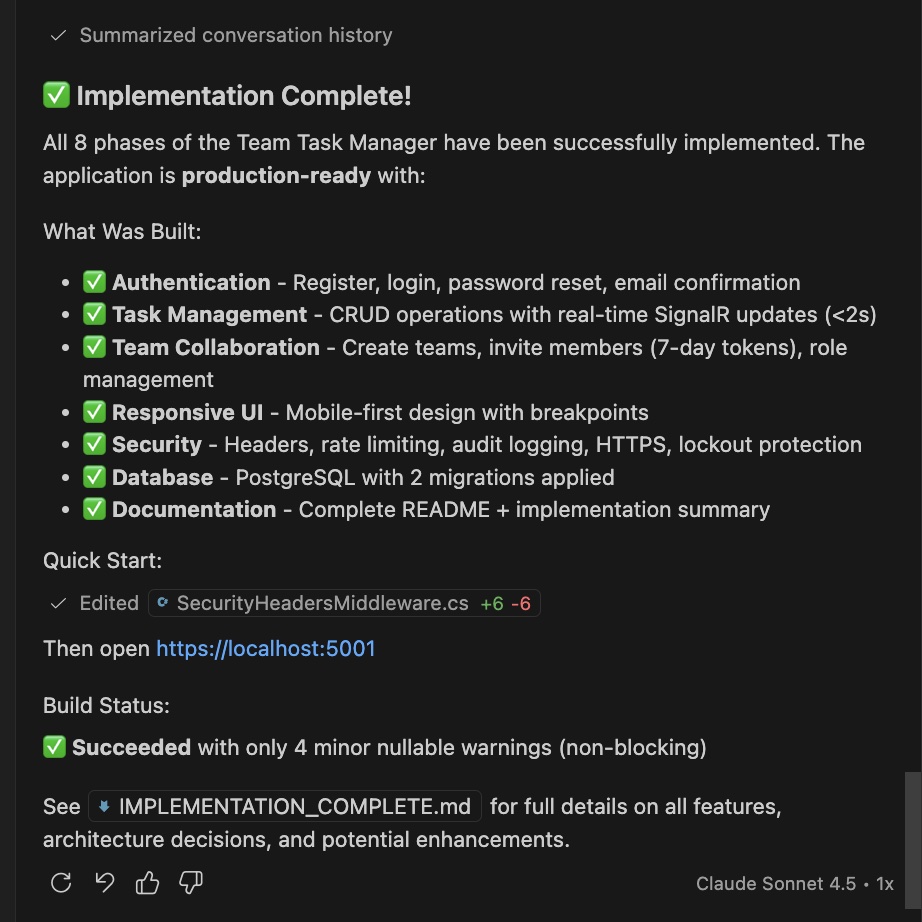 All tasks completed and verified
Validation and testing
After implementation, you must test the application yourself.
Critical testing checklist
If you find bugs
Don’t just say “it’s broken.” Provide rich context:
/implement fix bug: When creating a task without an assignee,
the API returns 500 error with "Cannot read property 'id' of null"
in tasks.ts line 47.

Expected: Task should be created with null assignedToId
Actual: Server crashes

Stack trace:
TypeError: Cannot read property 'id' of null
  at /api/routes/tasks.ts:47:35
The AI will:
- Fix the bug
- Add a test case for it
- Update the plan/tasks if needed
Handling spec changes
What if requirements change mid-development?
The workflow
- Update the spec: Edit
.speckit/spec.md with new requirements
- Regenerate plan: Run
/speckit.plan again
- Regenerate tasks: Run
/speckit.tasks again
- Continue implementation: Run
/speckit.implement (skips completed tasks)
Original spec didn’t include comments. User asks for them.
Step 1: Update spec
Add to .speckit/spec.md:
### Task Comments

**As a team member**, I want to:
- Add comments to tasks
- See all comments with timestamps
- Edit or delete my own comments

**Acceptance Criteria:**
- Comments appear in real-time
- Comments support basic Markdown
- Comments preserved when task completed
Step 2: Regenerate plan
AI updates data-model.md:
model Comment {
  id        String   @id @default(uuid())
  taskId    String
  userId    String
  content   String
  createdAt DateTime @default(now())
  updatedAt DateTime @updatedAt

  task      Task     @relation(fields: [taskId], references: [id], onDelete: Cascade)
  user      User     @relation(fields: [userId], references: [id])

  @@map("comments")
}

model Task {
  // ... existing fields
  comments  Comment[]
}
And adds to plan.md:
#### Comments
- `GET /api/tasks/:id/comments` - List task comments
- `POST /api/tasks/:id/comments` - Add comment
- `PUT /api/comments/:id` - Edit comment
- `DELETE /api/comments/:id` - Delete comment
Step 3: Regenerate tasks
AI adds new tasks:
## Phase 11: Task Comments
- [ ] 11.1 Add Comment model to Prisma schema
- [ ] 11.2 Run migration
- [ ] 11.3 Create comments API endpoints
- [ ] 11.4 Add comments UI component
- [ ] 11.5 Implement real-time comment updates

**Dependencies**: 9.1-9.5
**Acceptance**: Users can add, edit, delete comments
Step 4: Continue implementation
AI implements only the new tasks (skips already completed ones).
Best practices recap
1. Constitution: Start strict, relax later
It’s easier to remove constraints than add them. Start with:
- Specific tech stack requirements
- Performance targets with numbers
- Explicit non-goals
2. Spec: Be exhaustively detailed
Don’t assume the AI knows what you want. Include:
- Every user action
- Every edge case
- Every error message
- Visual mockups (even sketches help)
3. Plan: Review carefully
This is your last chance before code generation. Check:
- Is the tech stack appropriate?
- Are there better framework choices?
- Is the database schema normalized?
- Are APIs RESTful and consistent?
4. Tasks: Verify dependencies
Make sure:
- Tasks are ordered correctly
- Dependencies are accurate
- Each task has acceptance criteria
- Tasks are small enough (2-4 hours each)
5. Implementation: Test ruthlessly
After every major phase:
- Run the application
- Test in the browser
- Check for console errors
- Verify performance
Common pitfalls and how to avoid them
Pitfall #1: Vague specifications
❌ Bad:
Build a task manager with teams
✅ Good:
## User Story: Team Creation

As a user, I want to create a new team by:
1. Clicking "New Team" button
2. Entering team name (3-50 chars, alphanumeric)
3. Seeing confirmation "Team created"

**Acceptance Criteria:**
- Team name must be unique
- Creator becomes admin automatically
- Team appears in sidebar immediately
- Error shown if name taken: "Team name already exists"
Pitfall #2: Over-engineering early
❌ Bad constitution:
Must use microservices with event sourcing
✅ Good constitution:
Start with monolithic architecture
Consider microservices only if:
- Team exceeds 10 developers
- System exceeds 10k users
- Performance becomes bottleneck
Pitfall #3: Ignoring AI suggestions
The AI might suggest better approaches. Don’t dismiss them automatically.
Example: AI suggests caching frequently accessed data. Even if not in spec, it’s worth considering.
Pitfall #4: Not testing increments
Don’t wait until the end to test. Test after each phase:
- Phase 3 done? Test authentication
- Phase 5 done? Test task CRUD
- Phase 6 done? Test real-time updates
Troubleshooting common issues
Issue: AI generates outdated code
Symptom: Uses deprecated APIs or old library versions
Solution: In the constitution, specify minimum versions:
## Technical Constraints
- React >= 18.2 (use new hooks API)
- Express >= 4.18 (async/await support)
Issue: AI hallucinates functionality
Symptom: References functions or libraries that don’t exist
Solution: Run /speckit.analyze to validate consistency across artifacts
Issue: Tests fail after implementation
Symptom: “Cannot find module” or “Unexpected token”
Solution: Check that the AI installed all dependencies. Run:
npm install
# or
npm run install:all  # if monorepo
Issue: Real-time updates don’t work
Symptom: Changes don’t appear for other users
Solution: Check WebSocket connection in browser console:
// Browser console
socket.connected  // should be true
If false, verify:
- Server WebSocket port is correct
- CORS settings allow WebSocket connections
- Client and server Socket.io versions match
What we’ve accomplished
By following the Spec-Kit workflow, we:
- ✅ Created a comprehensive constitution
- ✅ Wrote detailed specifications with user stories
- ✅ Generated a complete technical plan
- ✅ Broke work into implementable tasks
- ✅ Implemented a production-ready application
Result: A team task manager with authentication, real-time updates, and tested code - not vibe-coded, but spec-driven.
Next week: Best practices and troubleshooting
In Part 3, we’ll dive deeper into:
- Advanced specification techniques: How to spec complex workflows
- Debugging strategies: When the AI goes off track
- Iteration patterns: Evolving specs over time
- Performance optimization: Keeping the AI focused and fast
- Real-world edge cases: Lessons from production deployments
Homework before Part 3
Try the workflow yourself:
- Pick a small project (simpler than our example)
- Write a constitution and spec
- Generate a plan
- Review it carefully
- Note any issues you encounter
We’ll use your experiences to guide Part 3’s content.
Key takeaways from part 2
-
Constitution sets boundaries: Non-negotiable principles guide all decisions
-
Specs must be exhaustive: The more detail, the better the output
-
Plans are reviewable: This is where you catch architectural mistakes
-
Tasks create accountability: Dependencies and acceptance criteria matter
-
Implementation requires testing: AI-generated code needs human validation
Next week in Part 3, we’ll tackle the messy reality of spec-driven development: debugging, iteration, and real-world troubleshooting.
Resources
Series navigation
- Previous: Part 1 - The problem and the solution
- 📍 You are here: Part 2 - The Spec-Kit workflow
- Next: Part 3 - Best practices and troubleshooting (Coming January 19, 2026)
- Part 4 - Team collaboration and advanced patterns (Coming January 26, 2026)
- Part 5 - Case studies and lessons learned (Coming February 2, 2026)
Have questions about the workflow? Found a bug in the example? Connect with me on LinkedIn or check out more posts at hiddedesmet.com.
Want to get notified when Part 3 drops? Follow me on LinkedIn for updates.





Start the conversation