Here is the loop I want before any Terraform leaves my machine, running on commit inside VS Code:
$ git commit -m "add storage account"
terraform fmt............................................................Passed
terraform validate.......................................................Passed
tflint...................................................................Passed
trivy....................................................................Passed
terraform-docs...........................................................Passed
Five checks, sub-second, no CI in the loop.
No pipeline involved, no waiting for CI to tell you the format is off or that you left public blob access on. That whole loop is held together by Anton Babenko’s pre-commit-terraform, a collection of hooks that wrap the tools you already use.
What I like about it: the feedback lands while the change is still in my head, not ten minutes later in a CI log I have to context-switch back into. It is fast, local, and boring in the best way, and boring is exactly what you want from a safety net.
What you’ll need: Homebrew (or any package manager), Docker Desktop running for the Terraform MCP server, and an Agent Skills-compatible host like Claude Code, Cursor, or Copilot. Everything else installs in one brew line below.
Quick links
Let me show the full setup on a tiny Azure example.
The infrastructure
One resource group and one storage account. Small on purpose: the point is the guardrails, not the architecture.
# main.tf
terraform {
  required_version = ">= 1.9"
  required_providers {
    azurerm = {
      source  = "hashicorp/azurerm"
      version = "~> 4.77"
    }
  }
}

provider "azurerm" {
  subscription_id = var.subscription_id
  features {}
}

resource "azurerm_resource_group" "this" {
  name     = "rg-${var.workload}-${var.environment}"
  location = var.location
}

resource "azurerm_storage_account" "this" {
  name                            = "st${var.workload}${var.environment}"
  resource_group_name             = azurerm_resource_group.this.name
  location                        = azurerm_resource_group.this.location
  account_tier                    = "Standard"
  account_replication_type        = "LRS"
  min_tls_version                 = "TLS1_2"
  allow_nested_items_to_be_public = false
}
# variables.tf
variable "subscription_id" {
  type        = string
  description = "Azure subscription ID"
}

variable "workload" {
  type    = string
  default = "demo"
}

variable "environment" {
  type    = string
  default = "dev"
}

variable "location" {
  type    = string
  default = "westeurope"
}
The min_tls_version and allow_nested_items_to_be_public = false lines matter later. Trivy will complain loudly if you drop them.
The version pins aren’t arbitrary. At the time of writing the latest stable Terraform is 1.15.6 and the latest azurerm provider is 4.77.0, so >= 1.9 and ~> 4.77 give you a sane floor while letting terraform init pull the current release. I checked the provider guidance with two MCP servers before writing the resource, which is worth doing whenever you generate Azure HCL.
Two MCP servers earn a place in this workflow, and they do different jobs.
The official HashiCorp Terraform MCP server (v1.0.0, MPL-2.0) gives the agent real-time access to the Terraform Registry: current provider docs, module inputs and outputs, and Sentinel policies. That’s how it knows azurerm 4.77.0 exists and what arguments azurerm_storage_account actually accepts today, instead of guessing from training data. It ships as a Docker image, so you need Docker Desktop installed and running for the server to start:
// .vscode/mcp.json
{
  "servers": {
    "terraform": {
      "command": "docker",
      "args": ["run", "-i", "--rm", "hashicorp/terraform-mcp-server"]
    }
  }
}
For Claude Code it’s a one-liner:
claude mcp add terraform -s user -t stdio -- docker run -i --rm hashicorp/terraform-mcp-server
The Azure MCP Server (now in microsoft/mcp, archived from Azure/azure-mcp) adds the Azure-specific layer: provider version floors, the validate-before-plan rule, and the HashiCorp style guide. Those three points shaped the code above and pushed the pin to ~> 4.77.
Install the Azure MCP Server VS Code extension, or configure it manually via MCP:
// .vscode/mcp.json (add alongside the terraform server)
{
  "servers": {
    "azure": {
      "command": "npx",
      "args": ["-y", "@azure/mcp@latest", "server", "start"]
    }
  }
}
Ask the agent to “check the registry and Azure Terraform best practices” before it writes resources. The MCP servers stop mistakes from being written; the pre-commit hooks catch whatever still slips through.
The MCP servers supply facts. A skill supplies judgement: the patterns and anti-patterns an agent should follow. Anton Babenko (the same maintainer behind pre-commit-terraform) publishes terraform-skill (v1.17.1, Apache-2.0), a best-practices skill for AI coding agents, and it treats Azure as first-class alongside AWS and GCP.
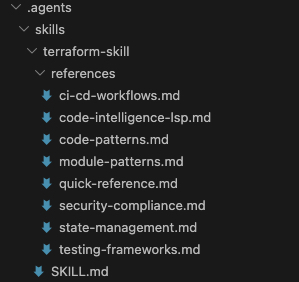
The SKILL.md is a diagnose-first workflow; the depth lives in reference files loaded on demand, so the agent only pulls in what the task needs.
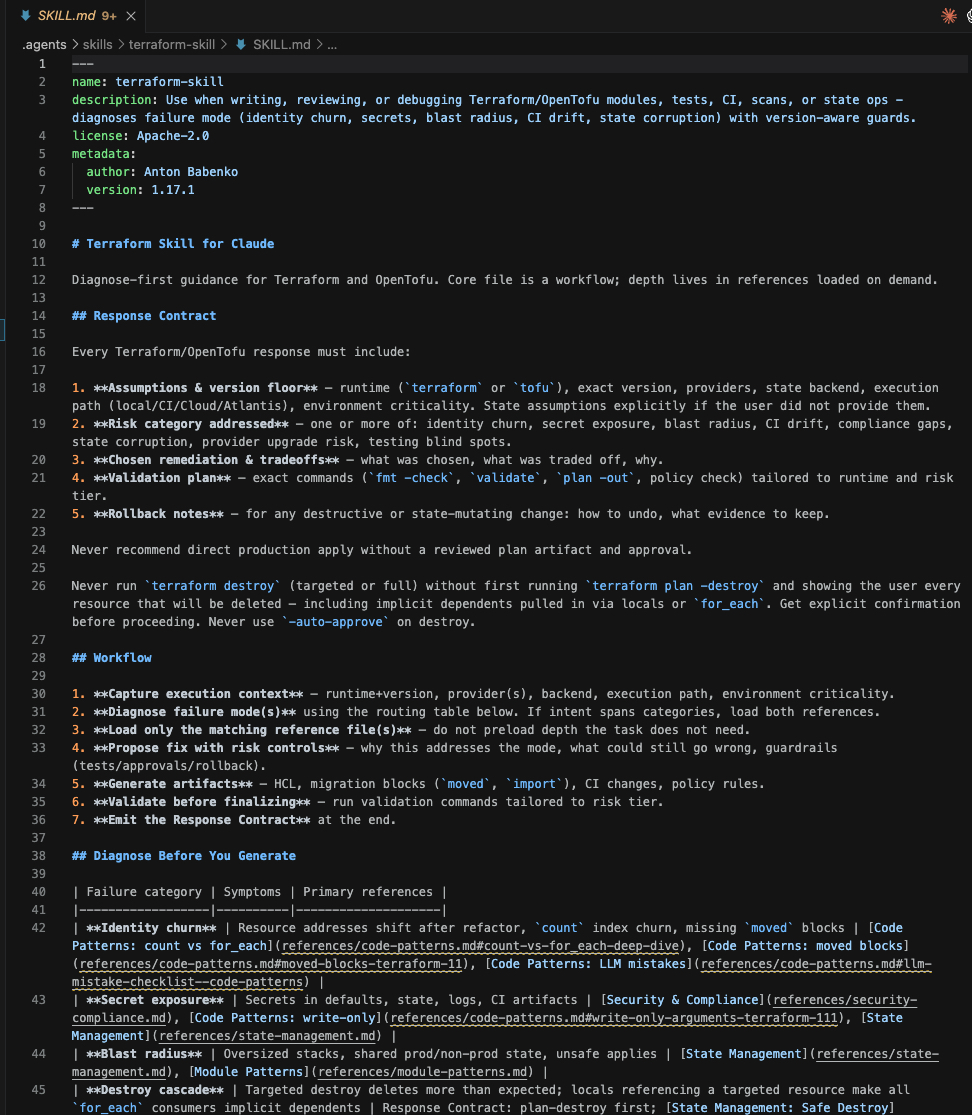
What it covers:
- Module structure: naming (
terraform-<PROVIDER>-<NAME>), inputs/outputs, version constraints.
- State management: remote backends including Azure, locking, multi-team isolation.
- CI/CD and security: GitHub Actions, Trivy and Checkov scanning, policy-as-code, the same tools wired into the hooks above.
- Testing: when to use native
terraform test (1.6+) versus Terratest.
Install it into any Agent Skills-compatible host (Claude Code, Cursor, Copilot, Gemini CLI, and others) with one command:
npx skills add https://github.com/antonbabenko/terraform-skill
Then prompt naturally. The agent loads the skill on demand:
"Build an Azure module: resource group, storage account, and a Key Vault, with native tests"
With the registry MCP for current facts, the Azure MCP for platform rules, and the skill for patterns, the generated HCL starts close to correct instead of close to plausible. That distinction is the whole reason I bother wiring up all three: an agent guessing provider arguments from stale training data is confidently wrong, and confidently wrong is the expensive kind.
The hooks shell out to real binaries. On macOS with Homebrew:
brew install pre-commit terraform tflint terraform-docs trivy
On Linux, grab them from each project’s releases, or use your package manager. Quick sanity check:
pre-commit --version
tflint --version
terraform-docs --version
trivy --version
Wire up pre-commit
Drop a .pre-commit-config.yaml in the repo root. This is where Anton’s hooks come in, each id maps to a tool:
# .pre-commit-config.yaml
repos:
  - repo: https://github.com/antonbabenko/pre-commit-terraform
    rev: v1.96.1
    hooks:
      - id: terraform_fmt
      - id: terraform_validate
        args:
          - --init-args=-backend=false
      - id: terraform_tflint
        args:
          - --args=--recursive
          - --args=--config=__GIT_WORKING_DIR__/.tflint.hcl
      - id: terraform_trivy
        args:
          - --args=--severity HIGH
          - --args=--tf-exclude-downloaded-modules
      - id: terraform_docs
        args:
          - --hook-config=--path-to-file=README.md
          - --hook-config=--add-md-fragment-to-readme=true
          - --hook-config=--create-file-if-not-exist=true
The block above is the copy-paste version you can use directly.
Why this config works well in practice
It balances fast feedback with meaningful coverage: formatting and syntax checks keep commits clean, tflint catches provider-specific issues, trivy blocks high-severity misconfigurations, and terraform-docs keeps module docs in sync automatically.
At a glance, here is what each hook does for you:
| Hook |
Tool |
Catches |
terraform_fmt |
terraform |
Inconsistent formatting |
terraform_validate |
terraform |
Syntax and config errors |
terraform_tflint |
tflint |
Azure-specific mistakes, bad references |
terraform_docs |
terraform-docs |
Stale or missing module docs |
terraform_trivy |
trivy |
Misconfigurations and security risks |
A few of those args are doing real work, so here’s what each one changes:
terraform_validate → --init-args=-backend=false: validate needs an initialized working directory, but you don’t want it reaching for remote state on every commit. This runs terraform init without configuring the backend, so the check works offline and without credentials.terraform_tflint → --args=--recursive: lint every nested module, not just the root directory.terraform_tflint → --args=--config=__GIT_WORKING_DIR__/.tflint.hcl: point tflint at one shared config at the repo root. The __GIT_WORKING_DIR__ placeholder is expanded by the hook to an absolute path, so it resolves correctly no matter which subdirectory triggered the hook.terraform_trivy → --args=--severity HIGH: only fail on HIGH (and above) findings, so low-noise advisories don’t block commits.terraform_trivy → --args=--tf-exclude-downloaded-modules: skip modules pulled from the registry. You can’t fix third-party code on commit, so scan only what you own.terraform_docs → --hook-config=--path-to-file=README.md: write the generated docs into README.md.terraform_docs → --hook-config=--add-md-fragment-to-readme=true: inject the table between the terraform-docs markers in that file instead of overwriting the whole thing, so your handwritten content survives.terraform_docs → --hook-config=--create-file-if-not-exist=true: create the README (with markers) if it isn’t there yet.
Pin rev to a real tag, check the releases page and update deliberately, not automatically.
Then install the git hook so it runs on every commit:
tflint needs its own config and the Azure ruleset to catch provider-specific mistakes:
# .tflint.hcl
plugin "azurerm" {
  enabled = true
  version = "0.28.0"
  source  = "github.com/terraform-linters/tflint-ruleset-azurerm"
}
Initialize the plugin once:
Now tflint flags things terraform validate won’t, like invalid VM sizes or deprecated resource arguments.
Run it
Run every hook against the whole repo before trusting it on a commit:
First pass, terraform_docs rewrites your README.md with an auto-generated inputs/outputs table. terraform_fmt fixes spacing. Both fail the run when they change files. That is expected: stage the changes and run again.
Now break something on purpose. Set min_tls_version = "TLS1_0" and commit:
$ git commit -m "lower tls"
terraform_trivy..........................................................Failed
- hook id: terraform_trivy
- exit code: 1

  AVD-AZU-0011 (HIGH): Resource uses an outdated TLS policy
  azurerm_storage_account.this should set min_tls_version to TLS1_2
The commit is blocked. The fix happens before the code is shared, not three CI runs into a PR review. That is the whole pitch: the cheapest place to catch a misconfiguration is the machine that wrote it.
It runs right in VS Code
This is the part I care about most: the checks fire on commit from the editor, not in a pipeline. When you stage and commit through VS Code’s Source Control panel, the same hooks run and the output shows up inline.
No context switch, no pushing a branch to find out CI is red. The feedback is right where you are working.
Local hooks are bypassable with git commit --no-verify, so treat this as fast feedback rather than an enforcement gate. If you later want a hard gate, the exact same .pre-commit-config.yaml runs unchanged in CI, but that’s a choice, not a requirement for this setup.
Takeaways
- Anton Babenko’s
pre-commit-terraform wraps fmt, validate, tflint, terraform-docs, and Trivy behind one config file.
- Pair the official HashiCorp Terraform MCP server (registry facts) with the Azure MCP (platform rules) and Anton’s
terraform-skill (patterns) so the agent writes HCL that is current, not guessed.
- Install the binaries, pin the hook
rev, add the Azure tflint ruleset, run pre-commit install.
- The whole loop runs on commit inside VS Code, security and docs failures surface in seconds, no pipeline needed.
Start with these five hooks on one small module. Once the loop feels natural, add terraform_checkov or infracost and let the config grow with you.




Start the conversation