This machine has three coding setups with separate skill folders: Claude Code, GitHub Copilot in VS Code, and a shared .agents/skills/ catalog that a couple of other tools read from. I counted them while writing this post: ~/.claude/skills/ has 56 folders, ~/.agents/skills/ has 36, ~/.copilot/skills/ has 6. 98 total. The six in Copilot’s folder are docx, loop, mermaid-diagrams, pptx, web-artifacts-builder, and xlsx, all shipped with the product, none of them added by hand. That distinction turns out to matter later in this post.
Seven of those folders, the entire google-agents-cli-* set, exist in the shared .agents/skills/ catalog. Their names match Google’s ADK Agents CLI, which installs development skills for scaffolding, evaluation, deployment, publishing, observability, and ADK coding. I went to open one for this post expecting that material. Instead: an empty references/ folder and no SKILL.md at all.
$ ls ~/.agents/skills/google-agents-cli-eval/
references/

$ cat ~/.agents/skills/google-agents-cli-eval/SKILL.md
cat: SKILL.md: No such file or directory
Seven folders point at a skill that can never load, because the file it’s supposed to read doesn’t exist. That’s what adding skills without ever subtracting one looks like.
Nothing tells you this is happening
I’ve written about this stack from the build side three times: SKILL.md itself, AGENTS.md and custom agents, and all five customization files working together. Every one of those posts is about adding a file, writing a good description, getting the loading behavior right.
None of them cover what happens after month twelve, when you have 98 skill folders and no idea which ones are dead weight.
And the reason it sneaks up on you is structural: the loading loop for skills is index → match → load. A broken or redundant skill just sits in the index step. It costs a few tokens of frontmatter on every request, never matches, never loads, never throws an error. There’s no CI job for “does this SKILL.md still make sense.” No linter flags a skill that duplicates another one. No runtime exception fires when the folder is empty. The failure mode is silent by design, which is exactly why it needs a deliberate audit instead of waiting for something to break.
The checklist: a stocktake, not a vibe check
I didn’t write the checklist I used for the audit. It comes from /skill-stocktake, a slash command that showed up when I pulled in a shared skills collection (its own frontmatter tags it origin: ECC). The command scans ~/.claude/skills/ and, if you run it from a project root, that project’s .claude/skills/ too, then evaluates every skill against a fixed checklist:
- [ ] Content overlap with other skills checked
- [ ] Overlap with MEMORY.md / CLAUDE.md checked
- [ ] Freshness of technical references verified
- [ ] Usage frequency considered
Every skill gets one of five verdicts:
| Verdict |
Meaning |
| Keep |
Useful and current |
| Improve |
Worth keeping, specific improvements needed |
| Update |
Referenced technology is outdated |
| Retire |
Low quality, stale, or cost-asymmetric |
| Merge into [X] |
Substantial overlap with another skill; names the target |
Two modes: a Quick Scan that only re-evaluates skills changed since the last run (5-10 minutes, driven off a cached results.json and file mtimes), and a Full Stocktake that walks the entire folder (20-30 minutes, chunked into batches of about 20 skills per subagent call so the context doesn’t blow up mid-review). The verdicts are holistic judgment against four dimensions, not a numeric score: actionability, scope fit, uniqueness, and currency. And it’s explicit that a bad reason isn’t good enough. “Superseded” is rejected. “Superseded by continuous-learning-v2, which covers all the same patterns plus confidence scoring, no unique content remains” is what it expects instead. Vague verdicts don’t help you decide anything, so the checklist forces you to write the decision, not just the label.
One scope limit worth flagging before you go looking for it yourself: this command only scans ~/.claude/skills/, and a project’s .claude/skills/ if you invoke it from that project’s root. It has no idea ~/.copilot/skills/ or ~/.agents/skills/ exist. The four-question checklist doesn’t care which tool loaded the skill, but right now the automation only runs against one of the three folders on this machine. That’s exactly why the manual one-liners further down loop over all three, not just Claude’s.
That’s the mechanism. Here’s what it actually finds when you point it at real files.
Three real examples from my own folders
continuous-learning vs continuous-learning-v2. Both live in ~/.claude/skills/, both tagged origin: ECC. Here’s the full frontmatter of each:
# continuous-learning/SKILL.md
name: continuous-learning
description: Automatically extract reusable patterns from Claude Code
  sessions and save them as learned skills for future use.
# continuous-learning-v2/SKILL.md
name: continuous-learning-v2
description: Instinct-based learning system that observes sessions via
  hooks, creates atomic instincts with confidence scoring, and evolves
  them into skills/commands/agents.
version: 2.0.0
Run this through the checklist and the verdict writes itself. Overlap with another skill: yes, direct, the v2 description literally says it evolves into “skills/commands/agents,” a superset of what v1 does. Uniqueness: none left in v1. This is a textbook Merge into continuous-learning-v2, not because v1 is bad, but because keeping both means every future session has to load two overlapping descriptions to decide which one applies.
The google-agents-cli-* set. Seven intended Google ADK Agents CLI skill names in the shared catalog, each pointing at an empty references/ directory with no SKILL.md. Actionability: zero, there’s no body to act on. This isn’t an “Improve” or a “Merge,” it’s a straight Retire, because a skill that can’t load isn’t providing partial value, it’s providing none while still occupying a slot in the index.
Copilot’s shipped six, for contrast. Run the same four questions against ~/.copilot/skills/ and the answers are boring on purpose: docx, pptx, and xlsx each own a distinct Office format, mermaid-diagrams and web-artifacts-builder cover different output types, loop is the odd one out for Microsoft Loop pages. No docx-v2 sitting next to docx. No duplicate names against the other two folders. That’s not better discipline on my part, it’s that these six shipped with the product instead of being added one session at a time over a year. The actual lesson isn’t “Copilot skills are cleaner,” it’s that a folder only accumulates overlap once you start adding to it by hand. Give Copilot’s skill folder the same year of manual additions Claude’s has had, and it’ll need the same audit.
None of these needed a 30-minute Full Stocktake to spot. They needed someone to actually look.
The same checklist applies past SKILL.md
The four-question checklist doesn’t care that it was written for skills. It applies to every layer in the five-file stack:
| File type |
What “overlap” looks like |
What “stale” looks like |
AGENTS.md |
Repeats a rule that’s already enforced by a linter or .editorconfig |
References a build command that no longer exists |
.instructions.md |
Two files with overlapping applyTo globs giving contradictory advice |
applyTo pattern matches a directory that got renamed |
SKILL.md |
Two skills answering the same “when do I fire” question |
A skill teaching an SDK version you no longer use |
.prompt.md |
A prompt file nobody has invoked in months, copy-pasted into chat instead |
Steps reference a tool or command that changed shape |
.agent.md |
Two custom agents with near-identical tool restrictions and system prompts |
A handoff button pointing at an agent name that got renamed |
If you’re only auditing SKILL.md files, you’re auditing the layer that’s easiest to check (there’s tooling for it now) and skipping the layer most likely to actively mislead you, which is AGENTS.md, because it’s always on and nobody wants to touch the one file every request depends on.
You don’t need a subagent-driven stocktake command to catch the two failure modes above. Both are one-liners.
Find skill folders with no SKILL.md at all, across every tool’s folder:
for d in ~/.claude/skills ~/.agents/skills ~/.copilot/skills; do
  [ -d "$d" ] || continue
  find "$d" -mindepth 1 -maxdepth 1 -type d | while read -r skill; do
    [ -f "$skill/SKILL.md" ] || echo "MISSING SKILL.md: $skill"
  done
done
Find skill names that exist in more than one of the three folders, which is your shortlist for “check these for actual content overlap first”:
find ~/.claude/skills ~/.agents/skills ~/.copilot/skills \
  -mindepth 1 -maxdepth 1 -type d -exec basename {} \; | sort | uniq -d
Neither of those tells you why a duplicate exists or whether it’s safe to delete. That part still needs a human, or an agent, reading both files and applying the four questions: overlap, overlap with the always-on files, currency, usage. But it turns “I should probably review my skills sometime” into a five-second command that hands you a concrete list to start from.
Put the audit where the work happens
The manual commands are useful, but they still depend on you remembering to run them. AI Engineering Fluency, Rob Bos’s VS Code extension, puts a version of this audit in the editor instead. It reads local session logs, then surfaces skills and tools that have been loaded but not used, along with their estimated prompt overhead.
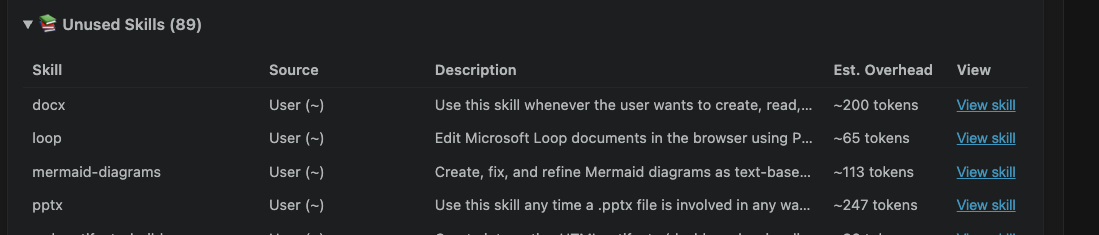
That matters because a folder with no SKILL.md and a valid skill that nobody invokes are different problems. The first is broken configuration. The second is a cost-and-context problem. You can spot the first with find; you need usage data to spot the second.
The extension applies the same idea to MCP servers and their tools. Its tool-curation view shows which servers were available, which tools were actually called in the last 30 days, and how much description context the unused ones keep adding.
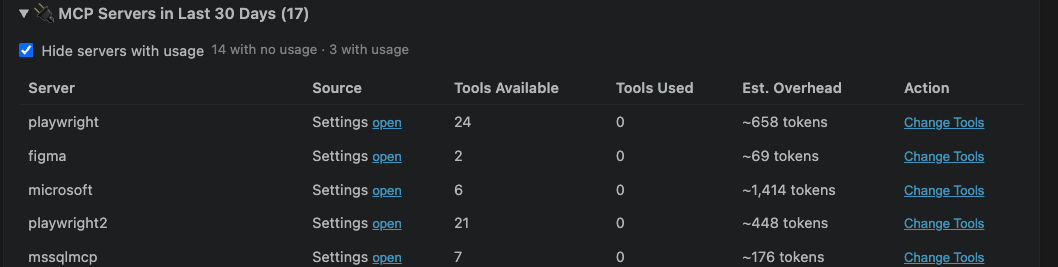
More importantly, it does not stop at a dashboard. The usage-analysis view turns the finding into a tip: remove or comment out an unused MCP server from mcp.json, review unused skills, or snooze the reminder if the tool is seasonal rather than stale.
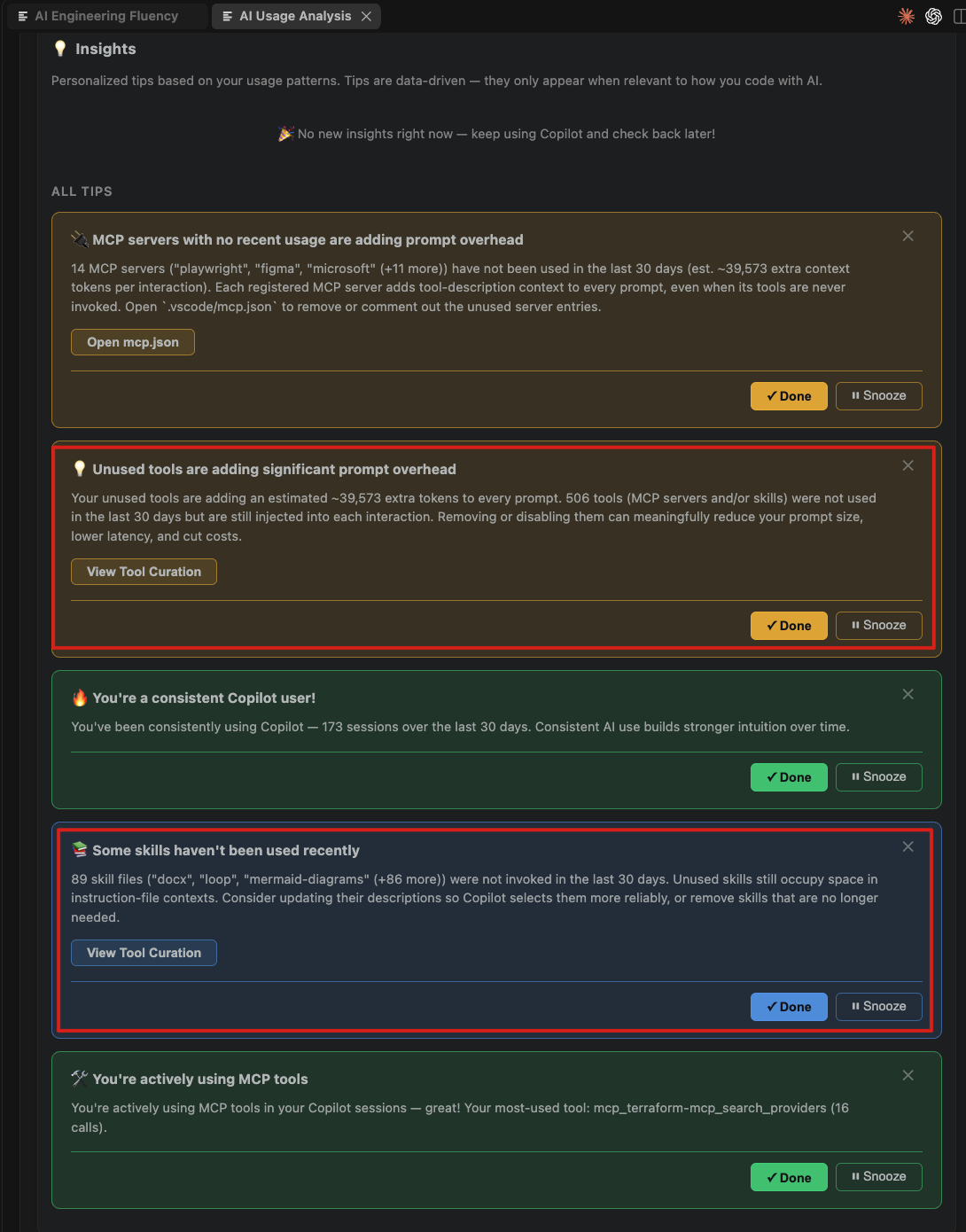
The skills and tool-curation work was added by Jesse Houwing. Fokko Veegens added checks for configuration drift between AI tools: for example, a Claude skill configuration that no longer has an equivalent in Copilot, or the reverse. That closes a gap in the two one-liners above. Duplicate names are only one kind of drift; two tools can have different names and still be carrying inconsistent instructions.
Worktree support has already been merged into the extension and is expected in an upcoming release. That matters for this audit because active worktree sessions should count as evidence of use, not disappear just because they are outside the main checkout.
Takeaways
- Skill and agent customization files don’t fail loudly when they rot. No build breaks, no lint warning fires. That’s exactly why they need a scheduled look, not a “we’ll notice when it’s a problem.”
- A verdict without a reason isn’t a verdict. “Superseded” tells you nothing; “superseded by X, no unique content remains” tells you whether to act.
- Duplicate names across tool-specific folders (
~/.claude/skills/, ~/.agents/skills/, ~/.copilot/skills/) are the cheapest thing to check first, before you spend time on deep content review.
- The four-question checklist (overlap with another skill, overlap with always-on files, currency, usage) applies to
AGENTS.md, .instructions.md, and .agent.md just as much as it applies to SKILL.md. Don’t stop the audit at the layer that has a tool for it.
- Tooling coverage is uneven today:
/skill-stocktake only audits Claude’s folder. The AI Engineering Fluency extension closes part of that gap in VS Code by surfacing unused skills and tools, their prompt overhead, and cross-tool configuration drift. The checklist still applies to the shared .agents/skills/ catalog and anything outside the extension’s reach.
- A clean folder isn’t a permanent state, it’s a head start. Copilot’s six skills are overlap-free because nobody’s added a seventh by hand yet. Claude’s 56 got messy the same way yours will: one skill at a time, with no pruning step in between.
- Run the two one-liners above against your own skill folders before you add skill number 99. There’s a decent chance one of them is already empty.






Start the conversation